
16 indispensable improvements in plaece.base in 2019
The year is drawing to a close and then comes the time for looking back and making lists. We proudly look back on a great year, full of optimisations and developments in Plaece.base. Looking back at all the things we made in 2019, we only realise how quickly things "get used".
Below are 16 features we have developed in 2019 (we already think they are indispensable!):
- Filter by application in the organisation overview
- Adding intermediate stops (cycling and walking nodes) via the route map
- Set the start/end point of a route based on a POI or junction
- Preview view for metadata, twitter and open graph
- Saving and further processing
- Region filter extended with drawn areas
- Automatic GPX data retrieval and filling in available fields
- Making error messages even clearer
- Interface of plaece.base translated into German and English
- Ability to search users and organisations by first name + surname
- Add filter for 'underlying organisations
- Add "Name" to address details
- Retained filter options after editing item
- Link items more easily with the new item selector
- Link PDF documents to itineraries
- Save button always in view
Filter by application in the organisation overview
In the overview of organisations (when logged in to plaece.base), you can now also filter by application. You then get an overview of all organisations that meet the application filter. This was a long-cherished wish from Marketing Groningen, have fun with it!
Adding intermediate stops (cycling and walking nodes) via the route map
When creating or editing a route, it is now possible to activate an extra map layer. This map layer shows all available cycling and/or hiking nodes. You can now add these nodes to the total list of waypoints via the map. This makes creating a route much easier.
Set the start/end point of a route based on a POI or junction
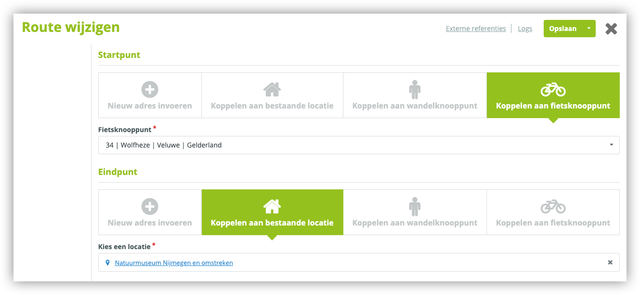
In the itinerary module, it is now possible to link a POI, cycling or walking point as a starting point or an end point. This way, you do not have to enter an address manually.
Preview view for metadata, twitter and open graph
In plaece.base, we have built in an SEO Snippet Preview tool, which allows you to see what your search result will roughly look like. When SEO information is entered, a user now sees a preview of what the information might look like in search engines (Google). Read more
Saving and further processing
With the "Save and continue" edit button, you can continue editing your item immediately after saving. Read more
Region filter extended with drawn areas
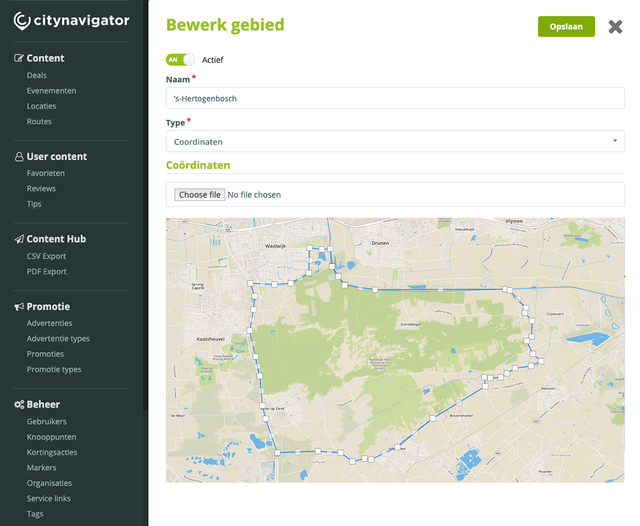
It is now possible to add areas based on a drawn area on the map. This area works on the basis of coordinates instead of postal codes. Read more
Automatic GPX data retrieval and filling in available fields
If a GPX is uploaded with a route, the address fields are automatically filled by reverse geocoding. So you do not have to puzzle over which information to enter for the start/end point.
Making error messages even clearer
From VisitBrabant, we received feedback that entrepreneurs had trouble filling in the base forms if a field was not filled in or filled in incorrectly. We did something about that. If a form now contains an error, we automatically scroll to the top of the form and open the tab where the error message is located.
Interface of plaece.base translated into German and English
The Interface of plaece.base is now also fully available in German and English.
Ability to search users and organisations by first name + surname
In the basic overviews of users and organisations, the "first name" and "last name" fields are now also searched when using the search field. This makes it even easier to find users and organisations.
Add filter for 'underlying organisations
If this filter is chosen in plaece.base, all items of all underlying organisations of a chosen organisation can be viewed in the overview. We hope Marketing Groningen (and everyone else) will be happy with this!
Add "Name" to address details
Sometimes, a street and house number are not enough. Noordwijk came to us with the problem that there is often no concrete address, but more of an indication such as "Near post 35". This is now possible. An extra field has been added to address details that allows an additional label to be added.
Retained filter options after editing item
When an item is saved in plaece.base, the filters of the overview will be preserved. This allows you to edit multiple items faster and easier, without having to reset the filters each time.
Link items more easily with the new item selector
It becomes easier to link different items together in the plaece.base. The new "item selector" gives you all the filtering and search options you need to find the right items you want to link together. Read more
Link PDF documents to itineraries
In addition to the option of linking to an external website, you can now upload a PDF of the route. This is then offered to the visitor as a download.
Save button always in view
It seems like it has always been this way, but in 2019 we have made sure that the "save" button is always present at the top of the screen. This way, it still works a little easier and faster!
The above list is just a sample of the many ongoing developments. In 2019, we went from base version 3.9 to base version 3.17, including hundreds of small optimisations and "bug fixes".
On to 2020!