
AVG proof videos on your website
The AVG requires users to indicate whether they want to allow cookies. If cookies are not allowed, no cookies may be placed (except functional and anonymous analytical cookies). Earlier, we told you about the AVG-proof cookie notification. If your site uses videos from Youtube (or Vimeo), these may not be shown just like that either.
To play Youtube (or Vimeo) videos, analytical and/or marketing cookies need to be placed. A user must give explicit permission for this.
What cookie notifications are there
There are currently 2 cookie notifications available:
Basic Cookie notification
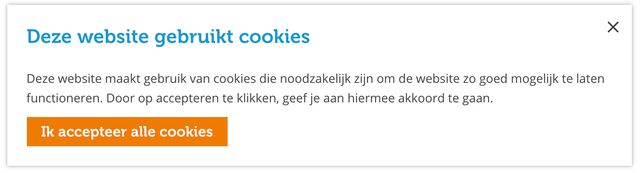
With the basic cookie notification, the user is told that cookies are being placed. He has no choice to reject them. He is only given the option to click the notification away. This cookie notification can only be used if you are sure that no analytical or marketing cookies will be placed (and thus only functional and anonymous analytical cookies). In practice, very few websites are compliant if they use the Basic Cookie Notification.
AVG-proof Cookie notification

The AVG-proof Cookie Notification gives visitors the choice of whether or not to accept certain cookies. With this cookie notification, you can be sure that you comply with the AVG guidelines around privacy. He can choose which cookies he does/does not allow (functional and anonymous analytical cookies are always allowed and also comply with AVG guidelines).
Videos are played with the Basic Cookie Notice
If your website currently uses the Basic Cookie Notification and you use videos, the videos will be played as normal. Analytical and marketing cookies are also placed, without the visitor being able to refuse them. So you don't actually comply with privacy laws. You have 2 options:
- Do not use videos
- Use the AVG-proof Cookie Notice
Videos are blocked by default with the AVG-proof Cookie Notification, unless the user gives permission to place cookies
Currently, the videos are not played if you do not accept cookies (thus AVG-proof), but you do not see that you have to accept cookies to view them either.
We have something new for you!
In the latest CMS update, we can show a message at the location of the video that you cannot watch videos because you do not allow cookies (this only applies if your website uses the AVG-proof Cookie Notification). This requires an update to your website.
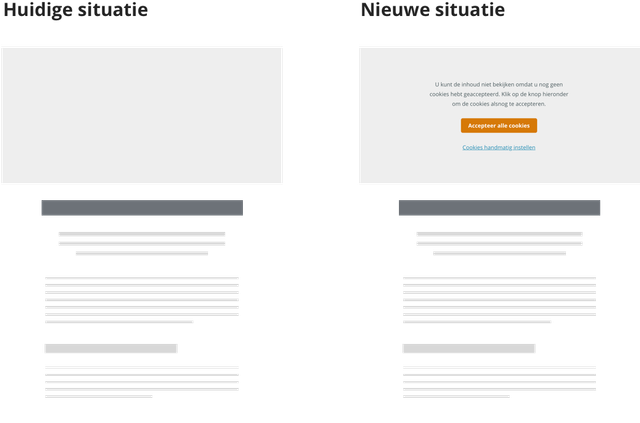
Example of AVG-Proof Cookie notification in combination with videos
Need help determining whether you are using the right cookie notification?
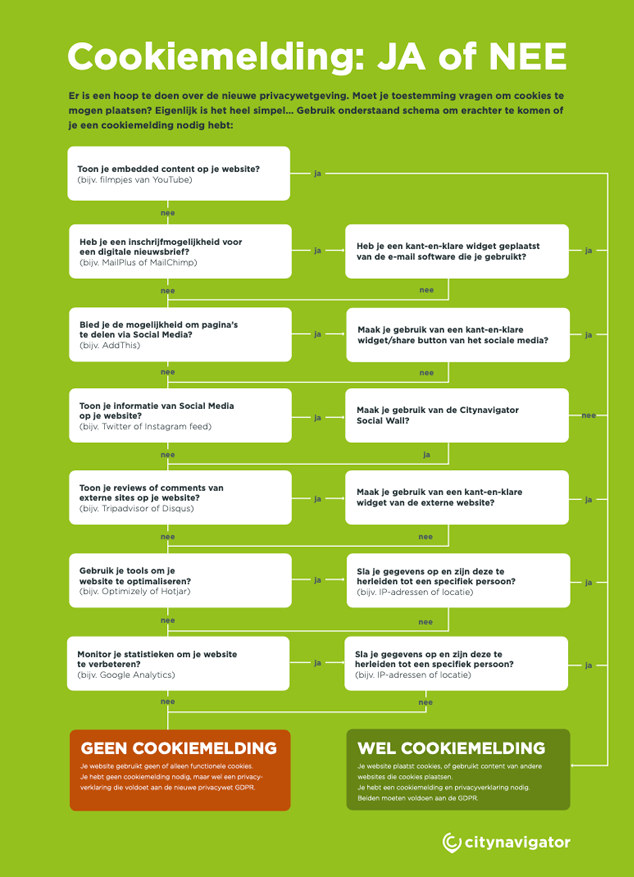
We get many questions about whether a cookie notification is needed and how extensive it should be. We have compiled a handy chart, which you can use to determine whether you need a cookie notification on your website.
Download the handy chart: Cookie Yes or No
Do you have questions about which cookie notification is most suitable for your website, or do you need help listing all cookies on your website? Contact us at support@insiders.nl.