
Content distribution: distribute your content across multiple channels with minimal effort
As a web editor, you are constantly collecting and creating valuable content. You want as many (relevant) people as possible to see this content. Of course, you can put everything on your own website, but there are so many more channels where you can spread your own beautiful content. Think about social media, newsletters, regional partners, entrepreneurs in your destination or other online platforms. How can you do this in a smart and efficient way?
Of course, you can copy and paste everything onto all the different channels, but you can do it much smarter and more efficiently. With a good content distribution strategy, you can achieve maximum distribution to relevant target groups with minimum effort.
Pssst....have you already listened to the podcast with Laura Nieuwenhuis of Regionaal Bureau voor Toerisme Heuvelrug & Vallei?
While blogging, she saw many destinations, but now she is rolling up her sleeves as marketing coordinator at Regional Office for Tourism Heuvelrug & Vallei. How does she handle different channels, target groups and content there? And what ambitions does RBT Heuvelrug have in terms of content distribution?
These are the tools we can use to help you with your content distribution
Your own website as primary content channel
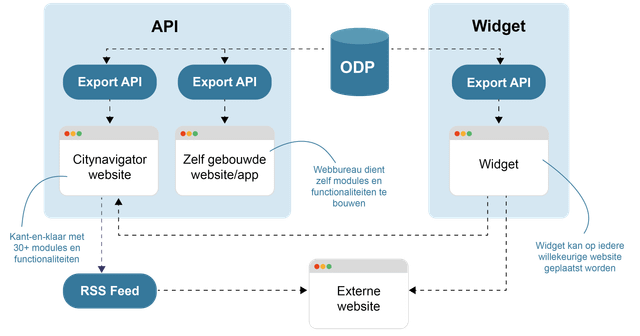
With your own website, you obviously have a great place to put all your beautiful valuable content. If you use the Citynavigator toolbox, you have a large number of page parts, modules and functionalities to make all this content as accessible as possible. By linking to our Plaece.base, you can also unlock large amounts of data via filterable overviews and maps.
Technical API
Without using too much technical terminology, an API is a data stream that a programmer can use to retrieve and display data. For example, consider retrieving all events in the province of Friesland taking place this weekend, sorted by which ones take place first (example: Uitagenda Friesland).
We use it ourselves!
Your own Plaece website also uses an API. We have already built a number of smart modules and functionalities, so you can get started right away. But we can also make our API available to external partners. A programmer (or web agency) can build their own website or app by using our API. Using rules, filters and programming code, you can then create your own functionality above to retrieve and display data. We obviously have extensive documentation available for technical people.
Widget
Don't understand programming? Or do you "just" want something simple on your own website? Then a widget might be something for you. With a widget, you can easily copy and paste a ready-made piece of code into your own website. But what is such a widget? It could be anything, of course, but we'll give you a simple example.
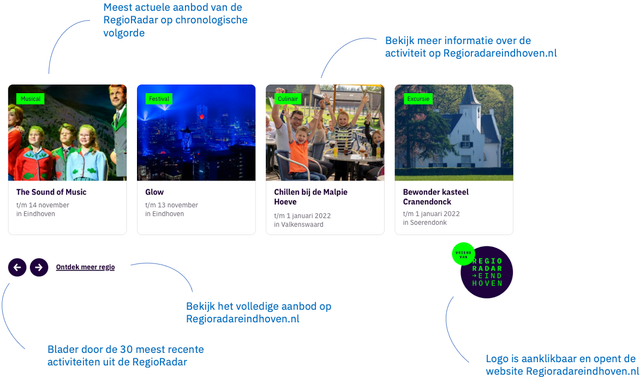
Show the latest regional offers on your website
Say you want to show the current events calendar from your region on websites in the region (i.e. not your own website). This could be cultural partners in the neighbourhood, for example. Then you can create a widget that shows the first upcoming events in an overview. This could look like this, for example:
RSS feed
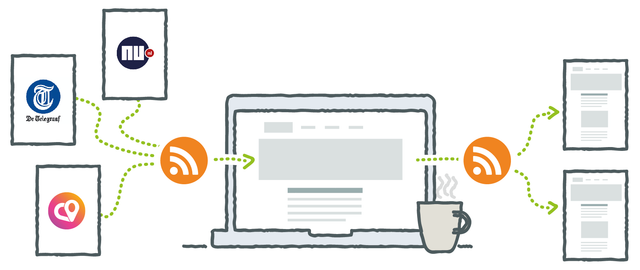 If you use blog posts or news items, you can use an RSS feed. This is a simple up-to-date list of articles. This list of articles can be read by an RSS reader. You will then get an overview of articles (title, image and hyperlink).
If you offer your own RSS feed to external parties, they can thus display YOUR blog posts on their own site. There will always be a link back to the original article on your own website.
It is also possible to send automated e-mails with the latest blog articles using newsletter software (e.g. Mailchimp or Spotler).
Read more in the article: Share your blog posts with RSS.
Connectors
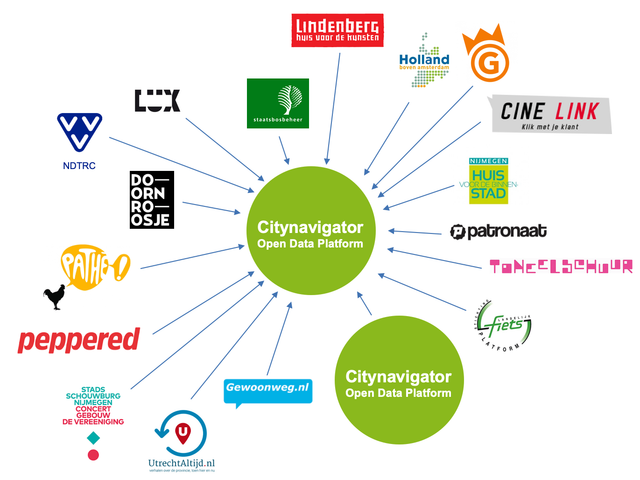
We have already written an article about it: Enrich your website with external data sources and connectors. But did you know that with a connector you can also exchange data with a Base from another city, region or area? This way, you can exchange your data with a neighbouring municipality, to be able to offer region-wide offers together. Handy, isn't it?