
Create a PDF with the dates for the coming weeks in your own house style
The PDF export module makes it possible to create a PDF with all events taking place in the coming week... and more!
With the Plaece.Base, you have a database at your disposal with all the tourist data from your own city or region. You have various options for sharing and distributing this data:
- Display data on your Plaece website
- Sharing data via an API
- Exporting data as CSV (Excel)
- Export data as formatted PDF
Sharing data via the ContentHub
In the ContentHub, we offer a number of options for distributing data from Base. The previous CSV export is housed here. The PDF export module can also be found in the ContentHub.
How the PDF export works
It is possible to generate a PDF of data from Base based on a number of settings.
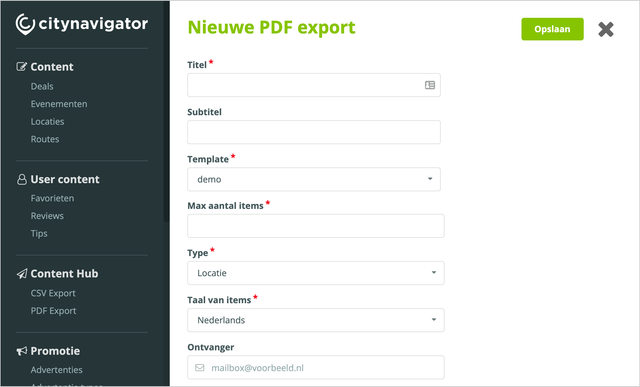
Choose what data you want to see in the PDF, you can choose from:
- Locations
- Events
- Routes
- Deals
- Tips
If you need a selection of your data (after all, you want customised exports), you have the option of setting certain filters:
- Data from a specific organisation
- Application
- Categories
- Tags
- Markers
- Areas
Bundle events per day
When exporting a PDF with all events, we have a number of additional options for you:
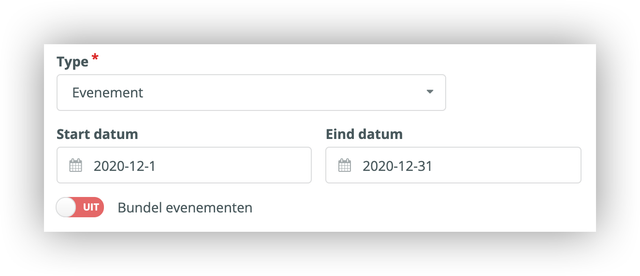
- Select a period
Choose a period for which you want the events to appear in your PDF export - Group events by day
By default, all events are listed in chronological order in the PDF (the first event to take place appears at the top). If the same event takes place several times, it is included in the list only once (with the note: ‘Takes place weekly’). With the ‘Group events’ option, events are grouped by day in the PDF.
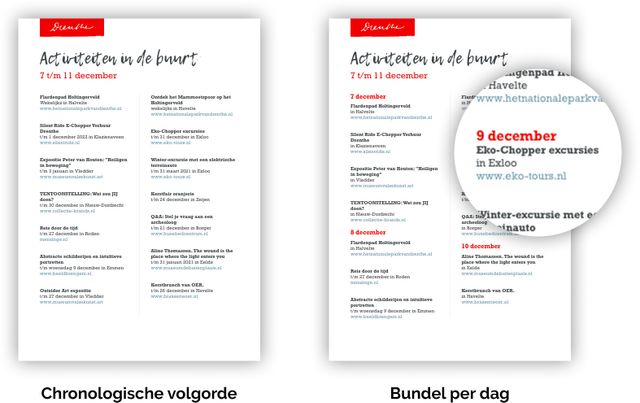
An attractive PDF in your own house style
Templates and templates can be loaded into the ContentHub. These can be designed entirely in your own house style. So you can export (and print) a beautifully designed PDF, completely in the house style of your destination!
You can do this with the PDF export
With the PDF export, you can export a PDF (and download it or have it emailed to you) at the push of a button. You can hang the PDF up as a poster in your visitor centre, give it as a flyer at the reception desk of a campsite, or pin it on the notice board of entrepreneurs, for example. The possibilities are endless. We will give you a few examples of possible exports:
- Agenda overview with all events for the coming week
- Overview of all packages of an entrepreneur
- Overview of routes in an area
- List of activities in the area, especially suitable for children
- Specially selected winter walking routes