
Pressure advice using the Sense of Place pressure map
Place a map on the website with the places that are quiet or busy. Visitors can then decide for themselves whether or not to go to a certain area within your destination.
We are all looking for the holy grail to show actual and real-time how busy somewhere is. Right now, there is only 1 party that can do this: Google (with their Google Popular Times). Google does not release this data, but does show it in its own Google Maps App. Since recently, at least at public transport stations, they show a warning if somewhere is too crowded. They are even adding an option, as a user, to report when it is too busy.
In order to create your own pressure database (based on up-to-date data), you will have to link a lot of sources. Since there are hundreds of different systems, all working in a different way and without a uniform data standard, combining all data sources is a challenge, to say the least. Since this takes an awful lot of time, energy (and money), we are also looking at more practical solutions that are relatively easy to deploy. Until we have a national crowding database, we can still issue crowding forecasts in a low-threshold, manual way.
Create a traffic forecast based on historical data
You undoubtedly know when your destination is busy or not. You have gained this knowledge in the past. Now you can reap the benefits! Make a list for yourself of places you would like to issue a busy recommendation for.
By "splitting" your destination into certain sub-areas, you can give an indication of the expected traffic for each area. This indication is based on past knowledge, but can also be updated based on "reports" from enforcement or city hosts. You will undoubtedly be in close contact with the people walking around your destination on a daily basis. This way, you can start making and adjusting your forecast with increasing accuracy.
In the CMS of your website, we create a special map for you, which is divided into your desired areas. For each area, you can enter the expected traffic per day/part of the day. On the website, this is easily visualised by means of a number of colours.
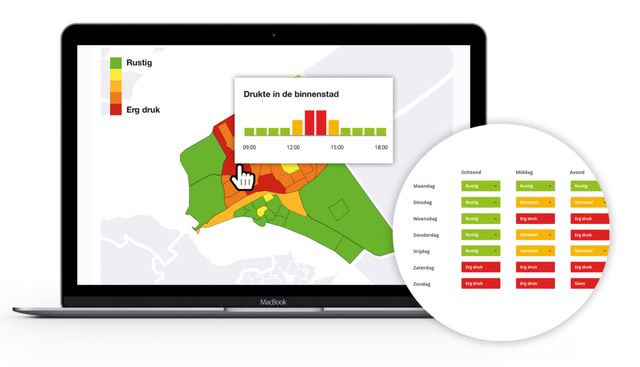
Example of a map of the city with a traffic forecast
This is what the Sense of Place pressure map can do
- Create a weekly forecast based on days and parts of the day
- Manually enter your traffic forecast in the CMS
- Show a clear map with all busy and quiet areas
- Respond to current events and update the map in real-time based on reports
- Inform visitors about expected traffic in advance