

We have greatly simplified the ability to add a call to action to a location or event. This functionality is automatically activated for everyone and immediately available. In this article, we tell you what we have improved and give you some tips for writing a good call to action.
A call to action (CTA) is an invitation for the user to perform a specific action, such as booking a trip or clicking a button. The purpose of a CTA is to move the user to action, with the aim of achieving a conversion.
In simple words: THE most important button on the web page. In the case of a Base location, this could be a restaurant, for example. The call to action would then be a button to "Book now".
In 3 steps you set up your own call to action
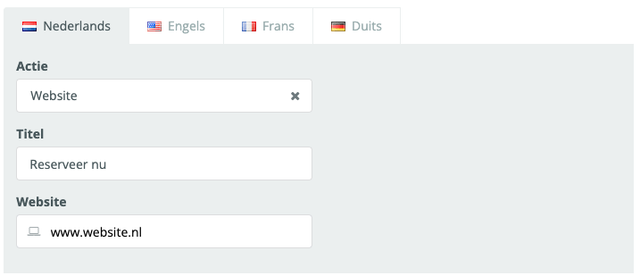
Step 1: Choose your action
What do you want your visitors to do when they click the call to action button on your website?
- Send an e-mail
- Open a website
- Calling a phone number
- Download a file
Step 2: Setting the button title
Write a short, catchy name for your button.
💡 TIP: Read some tips for writing a good call to action later in the article
Step 3: Set up follow-up action
Based on the action you chose in step 1, you will be given the option to enter your phone number, website or e-mail address.
Done!
Press save to save your call to action.
Why is a good call to action important?
A good call to action is very important because it boosts conversion. If the call to action is not clear and attractive, people do not understand what to do and quickly leave. After all, they come to your page with a certain goal, if they cannot reach their goal, they will look elsewhere. A good call to action should be clear and compelling, so that the user quickly and easily performs the desired action.
Tips for writing a good call to action
- Ensure clarity:
Make it clear what the user needs to do and why. Use clear and engaging language and set specific, achievable goals. - Create a sense of urgency:
A sense of urgency can help encourage users to take action. This can be achieved by offering a limited-time offer or by highlighting the limited availability of a trip or tour. Use action words such as ‘Now’, ‘Quickly’, ‘Immediately’, etc. - Offering value:
Offer a specific incentive to encourage visitors to take action. This could, for example, take the form of a special offer, information about unique experiences or access to exclusive tours.
Concrete examples of a good call to action
- "Book now (for a museum or event)
- "Discover our tours" (for a package deal)
- "Book directly" (for a restaurant)
Psst....did you know you can also add call to actions to calendar lines and stopovers of itineraries?
Say you have an event that takes place at several dates and times, you can create different calendar rules for it.
You can set your own call to action per calendar line
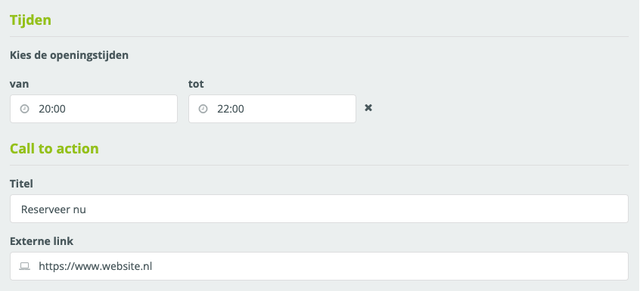
For plaece.routes, we previously wrote an article showing that you can now also add call to actions to intermediate stops on a route. Read the article: 3 new useful route functionalities
We hope this enhancement of implementing a call to action is a valuable upgrade for everyone. We'd love to hear what you think of it! If you need any help or suggestions, please let us know at: support@insiders.nl