
An OUT agenda that shows you exactly what you want. (Sorting 2.0)
Unique in the Netherlands: A UITagenda that shows all events in a logical order. Thanks to our new smart algorithm, unique and important events are shown before long-running events. In this way, visitors always see the most interesting events in their UITagenda.
How the old situation worked
Example of event sorting in the old situation
All events have one thing in common: they have a time and date when they take place. It is therefore a logical consequence that all events are sorted by date in the calendar. But that sounds simpler than it is. Because how do you deal with an event that only takes place today, versus an event that recurs weekly? In Base, you have the option of entering various types of patterns to ensure that the right time and date are shown in the UITagenda.
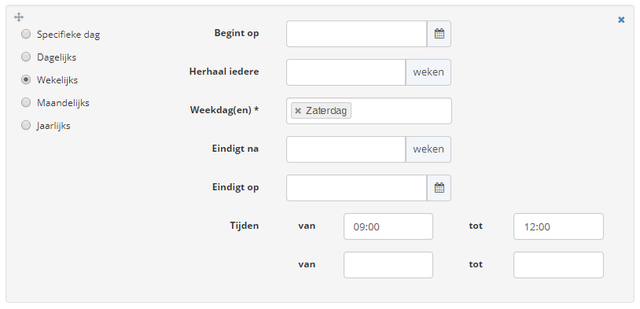
Example of calendar patterns in Base
These calendar patterns ensure that a lot of events take place every day. Consequently, the ordering of these events often goes wrong. In most cases, frequent events are shown first. This ensures that unique (large) events are often not immediately visible. A tour of various online UITagenda's taught us that this problem occurs everywhere. On the one hand, we want the visitor to see really relevant events first, but on the other hand we want to give the editors enough opportunities to show specific events more prominently.
The difference between promotions and scores
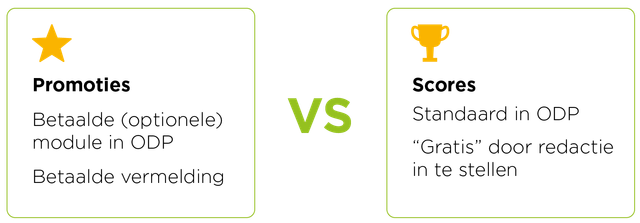
In a previous article about sorting overviews, we already wrote about the use of the "Promotion" module, which has now also been made suitable for events. In addition, the "Score" field is now also available for events. This allows editors to decide which events (within the selected date) should be displayed more prominently.
Improved results through sorting by calendar patterns
Calendar patterns allow events to recur more often, but also make sorting a lot more complex. In the complexity of the patterns, lies the opportunity to make the sorting a lot better. Based on the "type" of calendar pattern, we can predict whether an event is "more important" than another even, a brief explanation:
''An event that only happens once is very likely to be more important than an event that recurs daily.''
With that in mind, we can use the type of calendar patterns to make better sortings. This is because the type of calendar pattern indicates whether the event is "more important" than another event.
We now use the following sorting (in order of importance):
1. Specific date
(e.g. One-off concert like Guns 'n Roses in the Goffertpark)
2. Annual event
(e.g. annual event such as Dutch Design Week)
3. Monthly
(e.g. Foodmarket every 1st Sunday of the month)
4. Weekly
(e.g.: Pub quiz in the city café)
5. Daily
(e.g.: Cycling through the woods)
How the improved sorting works in the UITagenda
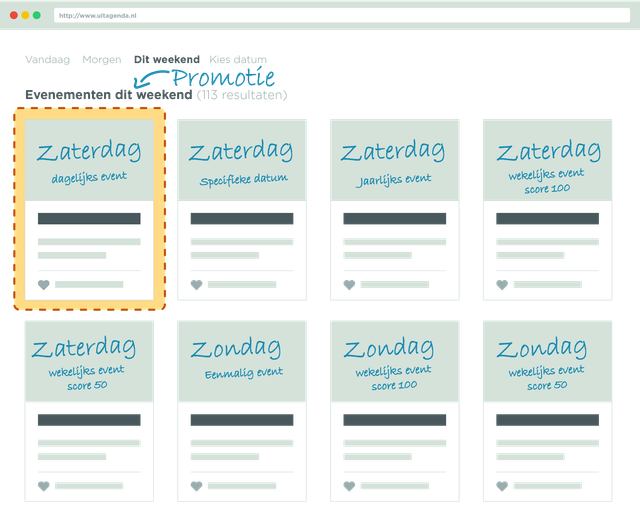
The sorting based on calendar patterns is the biggest intervention made to show events in a logical order. But in addition to the patterns, promotions and scores have been added that can influence event positioning.
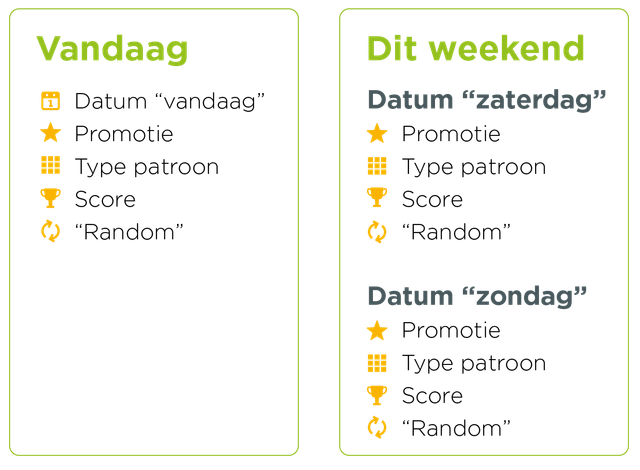
1. Date
Within the OUT Agenda, the date is always leading. An item from tomorrow will NEVER be shown before an item taking place today. If a period is chosen, all days are shown one after the other, regardless of any other characteristics of the event.
2. Promotion
In plaece.base, events can be assigned a specific promotion score via the ‘Promotions’ module. The higher this score, the higher the event will appear in the listings. Events with a promotion will always be displayed first in the listings AFTER the order by date. (Please note: If an event with a promotion is NOT taking place today, but tomorrow, it will therefore appear at the very top TOMORROW, not today!)
If there are several items with the same date AND promotion score, these items will be displayed in random order (per day) (or an editorial order can be determined using the ‘Score’ field).
3. Pattern type
Based on the type of calendar pattern, events are sorted within a day. An event that occurs annually represents an event that recurs daily.
4. Score (new functionality!)
In Base, through the new "Score" field, editors have the option to give the event a score. The higher the score, the higher the event will appear in the overviews within AFTER the date sorting. (The score can also be a negative value, which means that the event may also show up at the back of the overviews within that day). By default, an event has a score of "0". If there are several items with the same "Score", these items (per day) are shown randomly.
5. Random
All items that are not promoted or scored are shown randomly (per day).
Coming soon!
In the next major update, the new sorting will be available automatically. Ask your contact person when the next update is scheduled.
What do you think of these improvements? Or do you have any questions or suggestions? Let us know via info@plaece.nl/en