
Help website visitors with searching and filtering

A large rich offer for the visitor is of course great. But how do you make sure visitors find what they are looking for? With the most recent adjustments to the search algorithm and the way we have rebuilt the filter options, we ensure that the website visitor can find what he is looking for easier and faster.
Changes to the search algorithm
Within the getaway agenda, the operation of the search function has been further refined. Previously, the system automatically recognised if a search term matched a set tag. The search term was then automatically transformed into a filtering based on the tag. In certain combinations, this was not desired; this operation ensured that a search term that was the same as a set tag could never be searched.
This automatic recognition is now disabled. This means you can search on both a tag and a keyword as a search term. The search function provides a list of results in which the keyword appears. The tags are used to further filter/refine the result list. The result: better refined search results.
Mobile first filtering and searching
Meanwhile, about 50% of users visit a website on a mobile phone. There are also outliers where more than 60% of visitors view a website on a mobile phone.
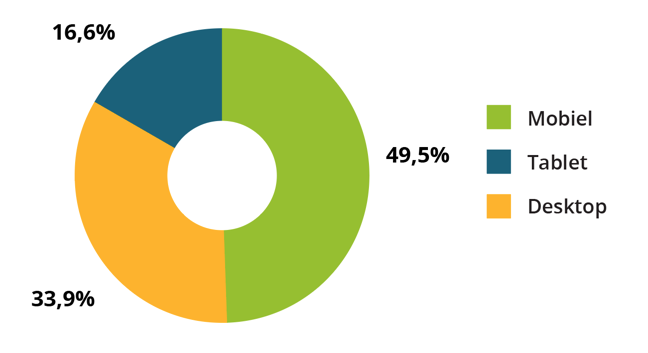
Source: Based on Google Analytics data from 25 Plaece websites (1 January 2016 - 30 September 2016).
With this in mind, the way in which searches and filters can be carried out on the website has been addressed. Based on the mobile first idea, several prototypes were developed and tested. In view of the limited space on the (mobile) screen, the search field and filter options are accommodated under 1 button. When tapping this filter button, the whole screen is used to show all search and filter options at a glance. In this way, the end user can initially be inspired by the results as determined by the website/editors and is not bothered by a multitude of filters and search options. If the visitor is really looking for a specific wish, all the options available for this are gathered in 1 place. We call this screen the filter box.
What has been adapted?
Based on the mobile first idea, we carefully considered which elements on the page are most important. In the case of the events calendar, these are obviously the events themselves. The most frequently used option on the page is the option to view today's events.
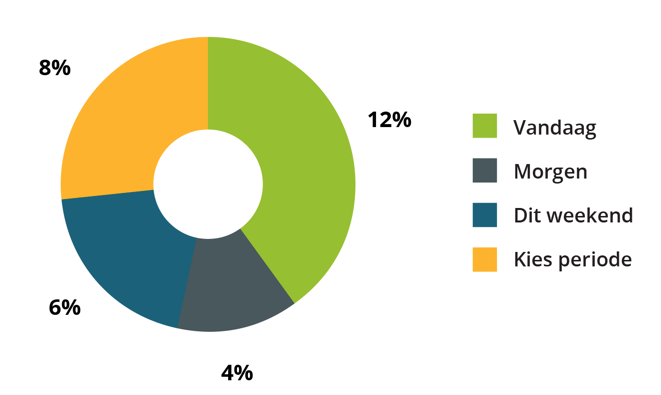
Source: Based on Google Analytics data from 25 Plaece websites.(1 January 2016 - 30 September 2016)
The result
In the Uitagenda, the date options are therefore very important (as many as 30% of visitors apply a date filter in the Uitagenda), which is why they are always displayed on screen. Next, a "Filter" button is displayed. If this button is tapped, the extended filter box opens.
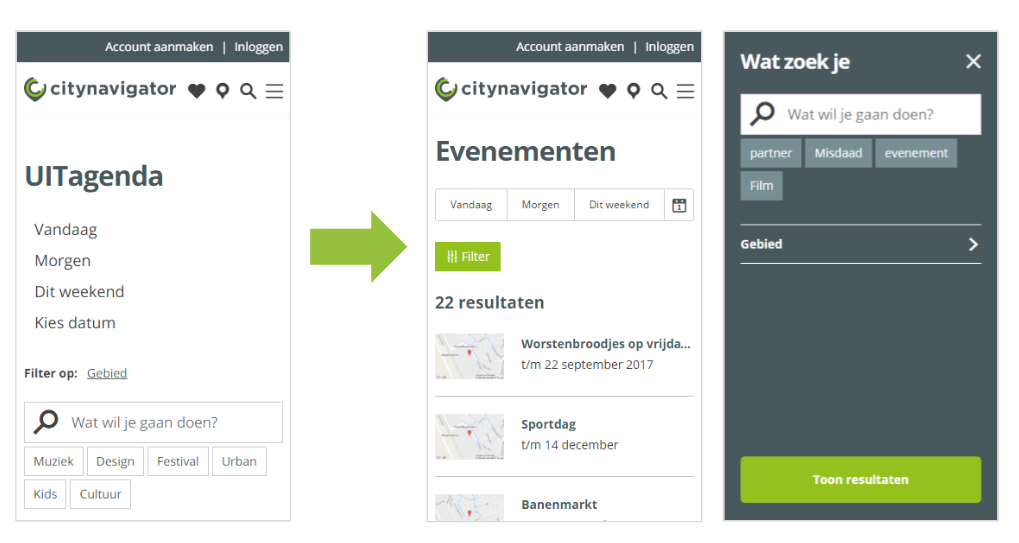
Before and after filter box optimisation
Currently, the filter box contains the search function, tags and the region filter. This can easily be expanded per installation with several refining filters (think kitchen type, free wifi or accessibility features).