
Pagepart titles visible in plaece.creator
In plaece.creator, you can manage the content on the page using "pageparts". There are now around 30 different pageparts available. We have made it easier to see what content is IN the feature, so that you know exactly which block to adjust when editing the page.
We have adapted this to pageparts in the plaece.creator
We now show the feature title that you entered yourself. This allows you to quickly recognise what content the feature contains. Have you not entered a title? Then we will look at the textual content in the feature itself. So you always know which content is in the pagepart. That saves a lot of searching!
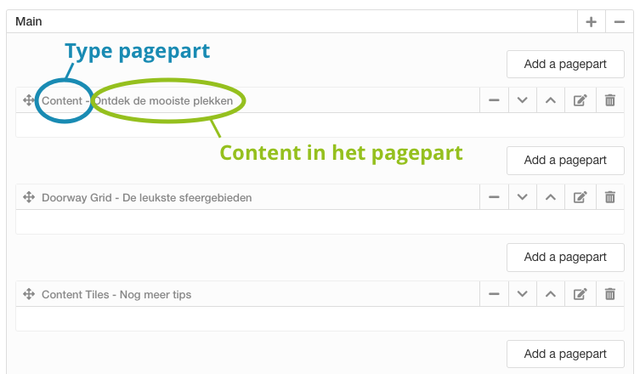
So you can see what content is in the feature
Visual representation pagepart selector
For administrators, it is sometimes difficult to remember what each pagepart looks like. Therefore, we have changed the way you can choose a pagepart. It has changed from a textual list to an overview with icons of the features. This way, you can very quickly see which features best match the content you want to put on the page.
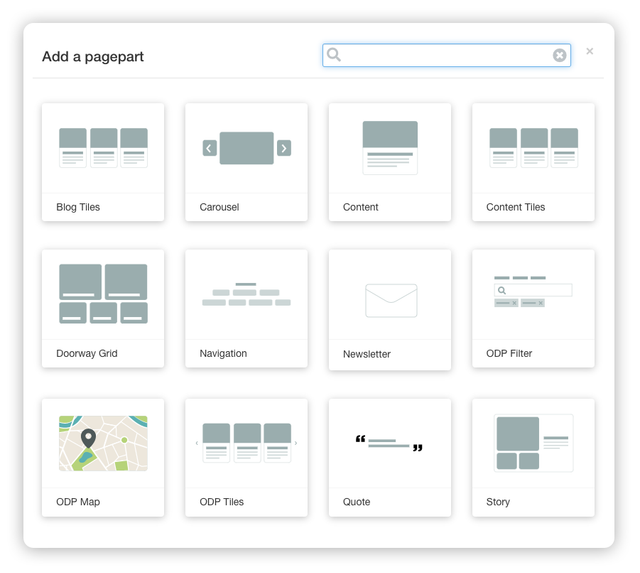
This is what the new way of selecting pageparts looks like
This functionality will automatically be made available in the plaece.creator when your website is updated. So please be patient!
Do you also have an idea to make your work easier?
This functionality was developed in response to a good idea in our suggestion box (thank you Marc from Maastricht Marketing!). If you have an idea of your own, send it in via: https: //idee.plaece.nl