
Personal favourites lists

With the new favourites module in plaece, website visitors can take their interesting hotspots with them wherever they go. On mobile or on a printout, the favourites are always within reach.
Add favourites to a personal favourites list
As soon as a visitor comes across an interesting location, route, deal or event on a website, it can be saved in the personal favourites list. Adding a favourite works very simply: on both overview and detail pages, an option is available to mark this location as a favourite. As soon as the "Add as favourite" button is clicked, the page is automatically marked as a favourite. These favourites can then be viewed again on one's own personal favourites list.
When adding or removing favourites, there is a clear distinction between logged-in and non-logged-in users.
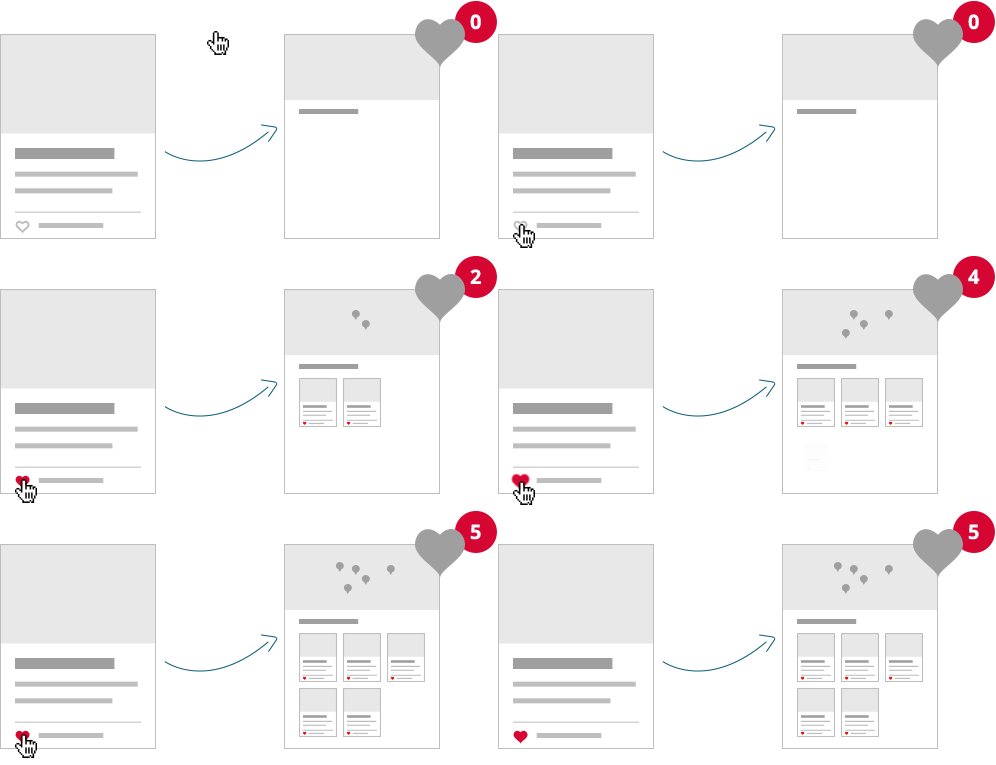
Favourites for anonymous users (without login)
When an anonymous user adds favourites, these are stored in a unique session on the device on which the visitor is active. So the anonymous visitor has a separate list on his desktop and on his mobile.
If visitors want to view their list on all devices, they need to create an account. At that point, the favourites are in a personal user profile.
Favourites with a personal account
For users with their own account, adding favourites works the same way as for an anonymous user. The biggest advantage for logged-in users is the fact that favourites are not stored in a session, but are linked directly to the user profile. Favourites are therefore immediately visible on his personal profile page. Visitors can thus view and edit their own list of favourites wherever they are (whether at home behind a laptop or on a phone in the train).

Example of the account page with personal list of favourites
Personal list of favourites
All favourites are collected in the favourites overview. This overview shows all favourites as pins on the map, or as a handy list. This way, visitors can also check "on-the-go" which favourites are nearby, or quickly look up the address of a favourite location.

Example of sharing favourites
Inspire friends and family
The personal favourites overview can of course also be shared with others via e-mail, Twitter or Facebook. In case you need a reminder of the most beautiful hotspots on holiday or there is no mobile coverage, it is also possible to print out the list of favourites and take it with you.

Example of the printout of the favourites list
Favourites for website managers and entrepreneurs
Every time a location is marked as a favourite, it also becomes available as a statistic in plaece.base as User Generated Content. This allows the website manager (or the entrepreneur himself) to see exactly how often his location has been added as a favourite.
The favourites module gives the website an extra personal layer, helping the website visitor to plan his visit. On the other hand, the website manager gains more insight into which hotspots are marked as favourites.