

Plaece.base August 2024
Every month we release a new version of Plaece.base. This month's version is: V3.66. The improvements in Plaece.base below will be available to everyone in August.
What has been improved?
- CSV Export for routes
The CSV export feature allows you to export data from Base (read more in the article ‘Exporting data using the CSV export’). This was previously available for Locations and Activities. We have now added Routes to this list. - Promotions retained when updated via connector
In some cases, items imported into Base via a connector would lose their promotion when updated via the connector. We have resolved this issue. - Technical updates
Updates to the underlying technology (For those interested: Composer, PHP)
New feature: Smart AI assistant - Automatic SEO text writing (Pilot phase)
The AI Assistant is currently activated as a pilot for a number of partners. They are trying out the feature and providing us with feedback, tips and suggestions. In the background, we are working on the next step to make more functionalities available in the AI Assistant. As soon as the AI Assistant can be purchased as a feature, we will be able to tell you more about the costs and exact possibilities.
New features:
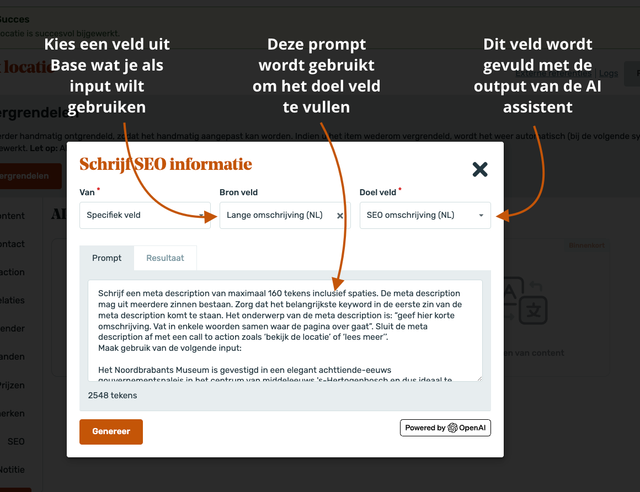
From now on, it is possible to use the data you already have in Base to fill other fields. For example, you select the long description from Base to generate an SEO description. We have compiled a whole library of the most ideal prompts to fill all SEO fields in Base. These prompts are available to all AI Assistant users by default. You still have the option to customise the prompts to your own Tone of Voice and/or requirements.
Plaece.creator August 2024
August's version will be numbered V2.74. This is important to know, because then you can always check what the latest version number of your own website is. That way, you know what improvements will be available to you when your own website is updated.
For Plaece.creator, you’ll see improvements as soon as an update has been implemented on your website. It may therefore be the case that you only see the improvements in Plaece.creator at a later stage. Would you like the improvements to be available at a time of your choosing? If so, please contact support@insiders.nl.
You can purchase new features as add-ons for your website. Adding features almost always requires an update, unless your website is already fully up to date.
What has been improved?
- Longer URLs now possible
If you wanted to link to a URL, you might sometimes have received a message stating that the URL was too long (e.g. if you wanted to link directly to a map overview with various filters activated). We have significantly increased the URL limit, so this problem is less likely to occur.
- Navigation page part optimisations
With the navigation page part, you can automatically generate a table of contents on your page, based on the page parts featured on your page. Some page parts were not previously included in the table of contents. This has now been resolved.
- Searching for images in subfolders in the media library
If you’ve created a well-organised folder structure in your media library, it can sometimes be difficult to find an image using the search function. We’ve added an extra filter option that allows you to search within subfolders as well. Select the main folder, filter by ‘include subfolders’, and you’ll automatically search all the subfolders.
- Codes for base categories
Do you use sub-sites? And would you like to have a better understanding of which categories appear on which website? You can now assign a ‘Code’ to a category. In that ‘Code’, you can (for example) specify the name of the website. This allows you to see very quickly which categories appear on which website.
- Blog tags link to an overview on the parent page
On a blog page, you can display an overview of linked tags at the bottom. Clicking on one of the tags displays an overview of all articles that match the selected tag. Previously, this was a general blog page showing all available filters across the entire website. Now, we display the parent blog page from which the article was opened. This gives you more control over which filters you want to display on the list.
- Technical updates
Updates to the underlying technology (for those interested: Core, Composer) and various performance improvements.
Featured: Duplicating pageparts
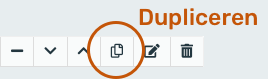
Yes! From now on it is possible: duplicating pageparts! Go to the pagepart you want to duplicate and click on the "Duplicate" icon.
New feature: Enrichment of search results
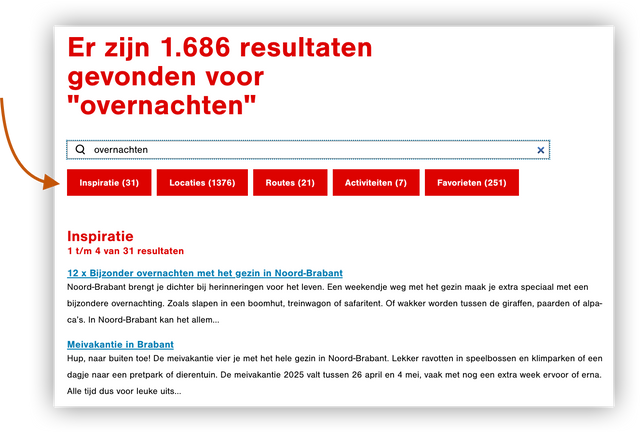
When using the search engine, results are grouped by "type": Content Pages, Activities, Locations, Routes. It is now possible to expand the search results page with tabs in which the various groups can be displayed. You can see at a single glance how many results there are within the various groups and can click straight through to the results of that group. This new feature can be purchased separately.
Receive Plaece News automatically?
Plaece News is sent to all Plaece licensees every month. If you do not yet receive it, sign up here.