
Publication options: Display content on the website, when you want it
Every website needs up-to-date content. Content that has to be prepared, scheduled and content that has to disappear automatically from the website after a certain period of time. As a final editor, you want to be able to determine when information should be visible on the website, or when information should disappear. A revamp of the publishing options in plaece.base makes this even easier for users.
In the old situation, there were multiple ways to get content publishing done. There was a publication tick, which basically determined the active status of an item (often called: visible or not visible on the website). In addition, you also had a publication and expiry date. The combination of these three items (should I place the tick or not, and what should I fill in for the publication date?) caused confusion in some situations. Scheduling an item also often proved more difficult than necessary. Add to this the recent operation of "expired items", and you quickly come to the conclusion that this process could be optimised.
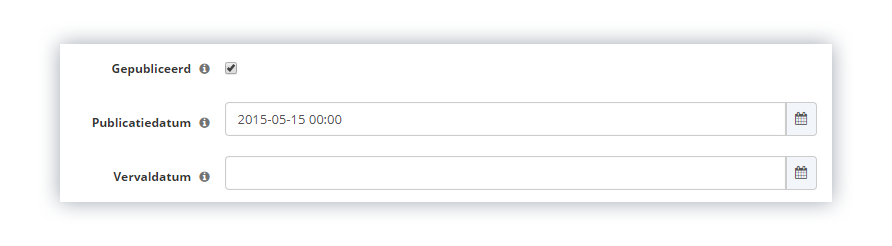
Old workings of publishing options
The new publishing options
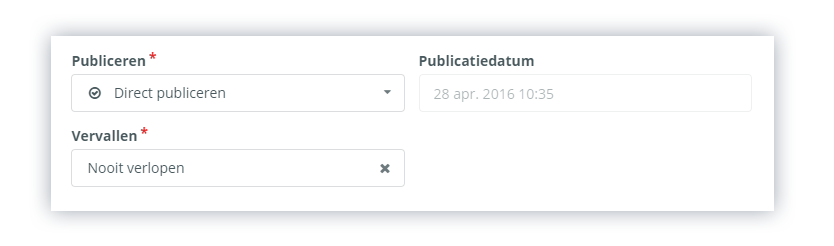
New publishing options
To make it more user-friendly for everyone, there are always three options available for publishing items:
Publish:
- Publish instantly
The item is published immediately and is available straight away in the API (and can therefore also be displayed on the website straight away) - Schedule
Select a date and time when the item will become available in the API (and therefore also visible on the website) - Do not publish
The item is not available in the API (and is therefore not displayed on the website)
With these options, you can very easily choose what to do with the information entered. Three options are also available for the expiry date:
Expired:
- Set expiry date
Select a date after which the item will no longer be available in the API (and will therefore no longer be displayed on the website). (For a more detailed explanation, see the article on Expired items) - Never expires
The item will always remain available in the API (and will therefore always be visible on the website) - Automatically expire (for events only)
When enabled, the system will check the calendar dates entered and automatically set the expiry date one day after the event’s final date. This ensures that past events are no longer visible on the website. (For a more detailed explanation, see the article on Expired items)
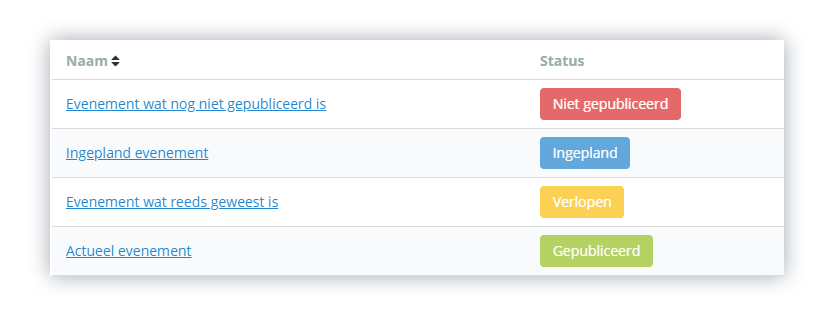
Overview of statuses in plaece.base
The right to publish
Currently, plaece.base is set up in such a way that all users can create new items (locations, events, routes, etc.) and publish them immediately. At that point, the items are also immediately visible on linked systems such as the website.
With the arrival of the new update for plaece.base, it is possible to indicate which specific user roles are allowed to publish.
Choose the desired workflow
The following user roles are available in plaece.base: owner, administrator and user. For these roles, you can set whether they are allowed to publish or not. For example, if the role "user" has no rights to publish items, the publication options are not available in the interface for the users within this role.
Three scenarios are currently available:
1. Users can publish
The current operation of base. Users can publish themselves
2. Users should never publish
Publication and expiry options are not available to users within the "users" role. An already existing item edited by a user is automatically placed offline so that an editor can check the item again. The editor will receive a notification of this (read more about notifications)
3. Users are not allowed to publish newly created items
The publish and expire options are not available to users within the "users" role. If the editor has published the item, the status will always remain the same thereafter. In other words, if the user makes changes on the item again, the item will also remain published. The editors can set notifications for item changes (read more about notifications)
With this update to the publishing options, each user can set more specifically what can be done with his or her information. With the update to the new version of plaece.base, this functionality will automatically become available to all users.