
Relevant content at the right time, in the right place
Respond to current events and your visitor's needs. To ensure the customer journey runs as smoothly as possible, it is important to display the right content on the website at the right time.
You can do your visitor no greater favour than showing him directly what he is actually looking for. For certain moments, we simply know which content is most sought after. Having that content prominently displayed on your website at just THAT moment ensures a flawless customer journey (most will not even realise they were presented with exactly what they expected).
Responding to holidays and seasons
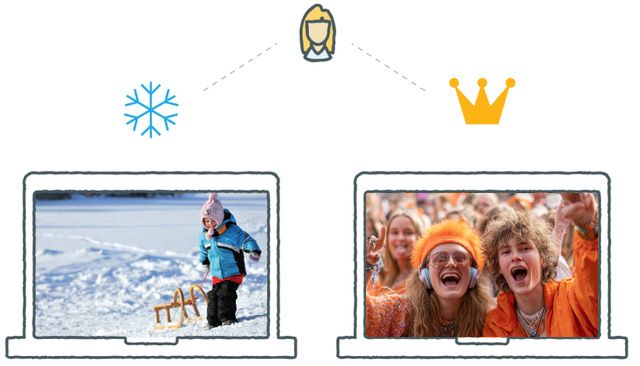
As an editor, you know exactly what is going on right now. With a content calendar, you can also plan well ahead for upcoming special dates. Think of the well-known retail moments such as:
- Sinterklaas
- Christmas
- Easter
- Valentine's Day
In the field of tourism and leisure, we also have special moments that can be anticipated in terms of content:
- Spring, summer, winter, autumn
- Summer holidays
- Skirt day
- Large events such as Glow or TT Assen
How nice it would be if you could prepare and schedule content for these special moments... During the autumn period, equip your most important pages with an autumnal photo and specially selected offers for rainy days. You can do that with plaece.planner.
This is how content planning works
For each content block, you can set when (and at what time) the content should appear on the page (or when it should disappear). This way, you can already plan your pages for seasonal changes or special takeovers during the holidays.
Choose a date and time for the content to be displayed
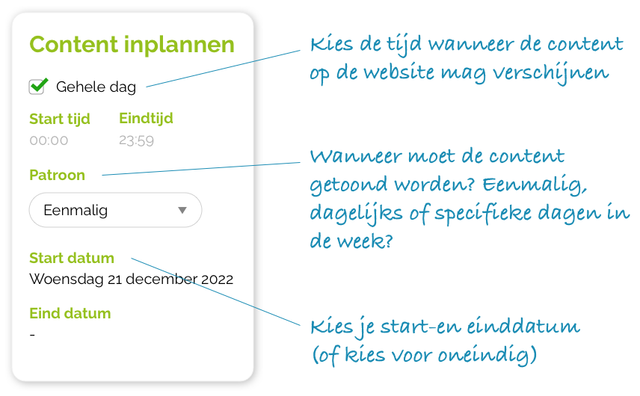
Content can be scheduled through three patterns:
- One-off
- Daily
- Weekly (day of the week)
All patterns can be provided with a start and end time and a start and end date (or infinitely).
Possibilities per pagepart
The following pageparts have content scheduling capabilities:
- Carousel
- Content
- Content Tiles
- Content Grid
- Doorway Grid
- Hero
- Magazine
- Showcase
- Story
- Toptask
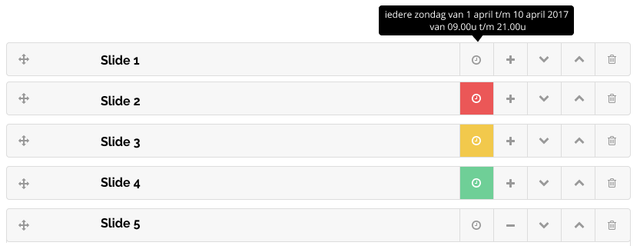 \
In the plaece.creator, you can easily see which content has been scheduled, is currently visible or has expired (and can be updated/deleted).
Practical examples
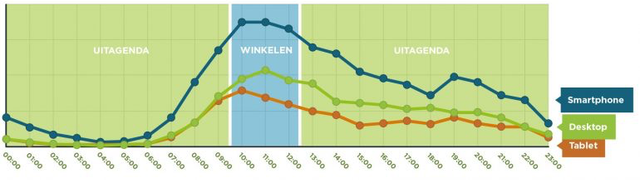
We know, for example, that a Sunday morning is mostly spent looking for information around "shopping". How nice would it be if you could immediately show your visitors all information about opening hours and shopping Sundays on Sunday mornings between 10:00 and 13:00?
A few other examples:
- Every Sunday, a slide shows activities for a lazy Sunday
- From the first day of summer, a summer photo is displayed with a link to all summer activities
- During Glow festival, a link to the current programme is automatically displayed.