
Score with your website: Answer your visitors' questions (likes Google too)
We know that the vast majority of your visitors come via Google. There, they ask a question about your destination. By answering your visitors' frequently asked questions, you increase the chances of people clicking on your website in the search results. We'll show you 3 different ways you can answer frequently asked questions.
We already wrote about it in 2019 but the topic is still relevant: visitors are asking Google a lot more questions. Google is also increasingly doing its best to answer those questions as quickly as possible. The shift from keywords to search phrases is also still a growing trend.
3 ways you can help Google answer questions
- Showing the right search results based on keywords and context
- "People also ask" section on the search results page in Google
- Showing Frequently Asked Questions on Google's search results page (with the new List pagepart)
Google shows the right search results based on keywords and context
It has been no secret for years that Google indexes and analyses your page to show the best search results to someone searching in Google. Based on page titles, keywords and content, Google can provide answers. But Google is getting smarter. By adding location data (location, coordinates), it can already show search results based on a GPS position. Writing good content is still the best way to let people find what they are looking for.
If you set it up right, Google will even display the answer to the search query as a "Google Summary" in the first search result.
We show summaries when our systems have found that this format helps people discover something faster, both through the page description and when they click on the link to read the page. These summaries are especially useful for people using a mobile device or searching for something via voice commands. Source: Google Summaries
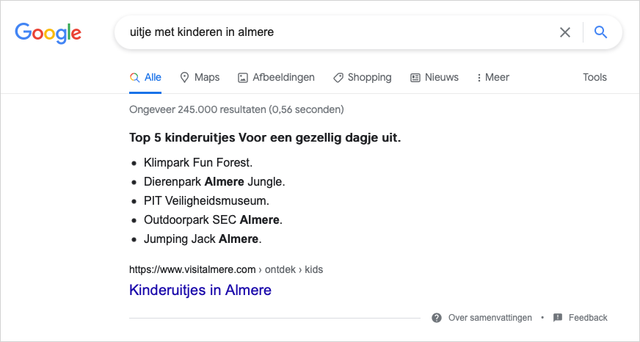
Example of a Google Summary for the search phrase: outing with children in Almere
Tip: Find out what "demand phrases" there are for your destination and set up a special page for them. Start from the 5 W's (who, what, where, why, when...and HOW) and write your content for that. Top 10 lists always score well in search results. Frequently asked questions include:
- What to do in ...
- What must you have seen in ...
- Where can I eat well in ...
Wondering which questions are asked about your destination? Contact us, we can help you with that!
"People also ask" section on the search results page in Google
Google is now so smart that it can "invent" its own questions (and answers) around your search query. For this, they have devised the "People also ask" section that they display on the search results page. How this section works is still a "black box". Little information is yet known about when you do/don't appear in this section.
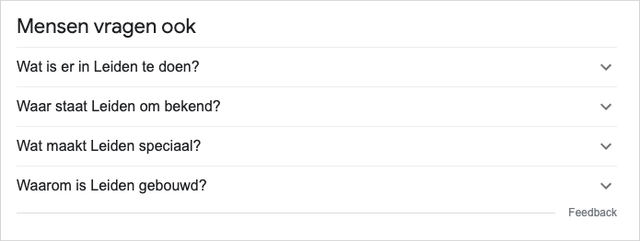
Example of "People also ask" on Google following the search query "Leiden".
Also, the questions are not always the same. One day you will be among them, the next day not. There is nothing else you can do (at the moment) but write the content on your website to the best of your ability. Make sure you are as relevant as possible within your topic. At least at the time of writing, it doesn't seem to matter whether you are a "big" or "small" website. As long as Google thinks your website knows the answer to a question.
Frequently Asked Questions Rich Snippets
Google has several options for displaying search results richer on the search results page. To do this, they use Rich Snippets. Earlier, we wrote about the use of Reviews, Events and Blogs, but now you can also use Frequently Asked Questions.
By adding structured data to the content on your page, you instruct Google that something is a question and an answer. Google can then display this data in the search results.
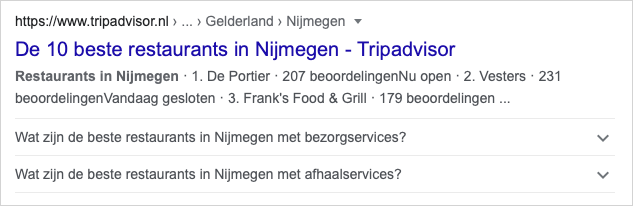
Example of FAQ Rich Snippet
Currently, the Rich Snippet for Frequently Asked Question is often used by "commercial parties" such as Tripadvisor (see example above), but from now on we also have a new Plaece pagepart that allows you to submit these Rich Snippets to Google.
Create your own FAQ Rich Snippets with the FAQ pagepart
The new FAQ pagepart is especially designed for list creation. These lists can contain frequently asked questions that Google can use to enrich search results.

Example of FAQ pagepart
Tip: By adding the FAQ pagepart to pages (with questions about that subject), you help visitors to your website (with related information) and increase the chance that Google will provide your search results with answers to frequently asked questions. There is a setting in the pagepart that allows you to indicate whether the information may be used as a Rich Snippet. This allows you to determine whether Google uses the content in their search results.
Benefits of the FAQ Rich Snippet:
- A search result with frequently asked questions breaks through the "normal" search results, so you stand out more! You also take up more space, so it takes longer for them to scroll past your search result.
- Visitors immediately see related answers to any questions they may have. So you confirm your role as an authority and knowledge holder in that area.
- The content on your page is even better structured, Google understands your page better and can potentially rank better.