Use 301 redirects to maintain your SEO ranking
At Insiders, we regularly get help questions from our partners about the deployment of 301s. What exactly is a 301 and how can they best be deployed for a website? In this article, we dive into the world of 301s and bring you up to speed on this topic.
Before we talk about the application of a 301 on the website, it is important to know exactly what a 301 is.
What is a 301 redirect
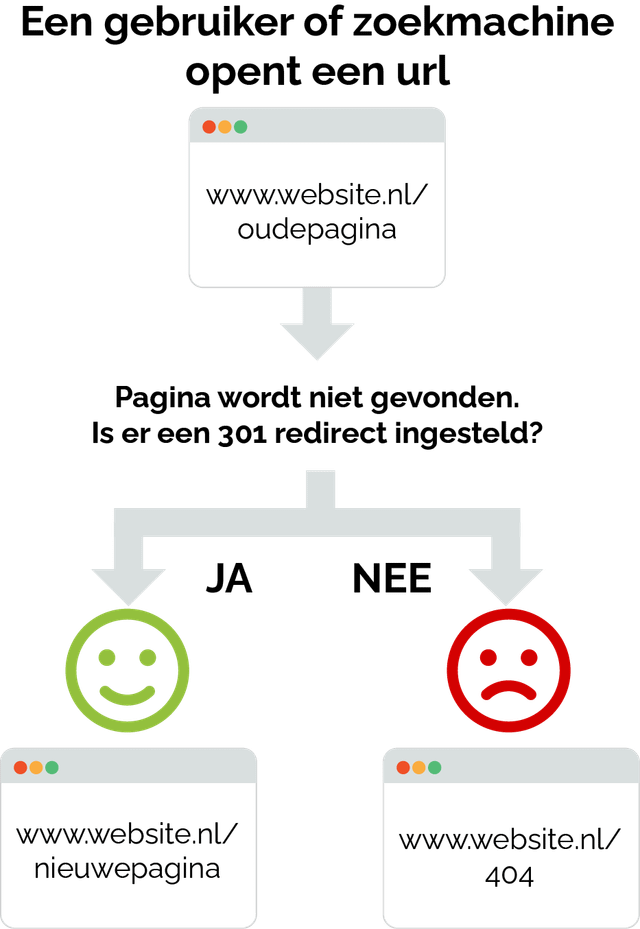
A 301 is a redirect from one page to another. The technical meaning is: 301 Moved Permanently.
A 301 redirect tells the search engine that a page has been permanently moved to a different URL.
With this method, you can ensure that visitors land on the right page of the website. Suppose a page on the website expires, you want to prevent visitors from ending up on a 404 (non-existent) page. In this case, you can use a 301 and redirect visitors to the correct content on the website.
Why do you use 301's?
- The main reason for setting up 301s is to maintain Search Engine Optimisation (SEO) rankings. The accumulated SEO value of a specific page ensures that the page is easily findable within search engines such as Google or Bing. It is therefore super important to maintain the accrued SEO value. Suppose a new domain or page is created, it has no SEO value in the beginning. In other words, you start from scratch. By using 301s, you can ensure that the SEO value and SEO rankings are carried over from the old to the new domain or page.
- In addition, the use of a 301 is highly appreciated by website visitors, as it takes them directly to the right page.
When do you use 301's?
There are several applications in which the use of a 301 is important. Below, we describe four different scenarios that often occur in practice.
Scenario 1: Change of website structure
When the website's menu structure is changed, for example when renaming or rearranging pages in the main navigation, you can assume that 301's are necessary. This is because when the menu structure is changed, the URLs of pages (and underlying pages) also change. Where previously visitors could reach a URL, a change in the structure will lead them to a non-existent page (404). Because of this, it is important to use a 301 to indicate what the new page is and therefore have it redirect nicely.
- Former url: www.website.nl/dagje-uit/wandelen
- New url: www.website.nl/nl/actief/wandelen-fietsen/wandelen
Scenario 2: Website migration (new domain)
As soon as an old website switches to a new website, it is important to set up 301's from the old website to the new website. This is because a website builds up SEO value over time, which ensures higher rankings and traffic in search engines. As soon as a new domain is deployed, you start from scratch again. With 301s, you can ensure that the SEO value is carried over to the new website, so no rankings and traffic are lost. Here, it is important that all indexed pages are redirected to the new pages on the new website for optimal retention of visitors and SEO value.
- Old website: www.oudewebsite.nl/dagje-uit/wandelen
- New website: www.nieuwewebsite.nl/dagje-uit/wandelen
Scenario 3 Expired pages
Is a page no longer relevant or expired? Then it is customary to put the page offline, so that it is no longer accessible to visitors. However, this page will then no longer be visible in search engines. Do you want to keep the traffic on this page and redirect it to an alternative relevant page? Then it is advisable to set a 301 to the new page you have in mind. psst...did you know that we already do some special things with expired events? Read the blog article: Even better ranking through "expired items" functionality.
- Url of expired event: www.website.nl/evenementen/14-november-2022-Muziekfestival
- Url with relevant event info: www.website.nl/blog/terugblik-muziekfestival
Scenario 4: Temporary campaign pages
Once an online campaign page or website is set up, it is often assigned a unique URL. However, the content may not be placed on this URL. For instance, a different campaign URL may be used in offline and online communication, because it looks better from a marketing point of view and comes across better to the target group. By means of a 301, it is possible to use the campaign URL in all communications, automatically redirecting all traffic to the correct pages on the website.
- Url used in campaign: www.campagneurl.nl
- Real url: www.website.nl/dagjeuit/campagne
Should you always set up a 301 redirect, or is a 404 also fine?
If the content on the page that is now gone (or whose url has been changed) is in a different place, then that is certainly advisable. But sometimes the content is just really gone. Then it's fine to get a 404 page for that. The page will then also slowly disappear in the search engines. Read tips on 404 pages in our article on Frankwatching: Help! a 404 message on my website...now what?
Need help setting up a 301 list?
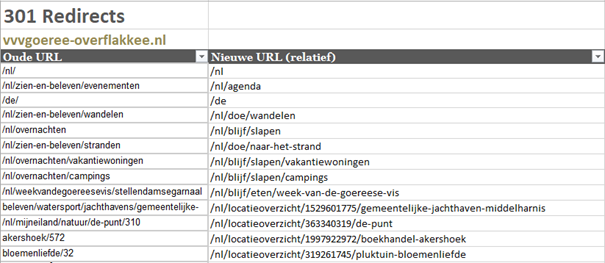
In preparation for setting up 301s, Insiders creates a 301 list. An Excel document shows which pages are indexed, generate traffic and which pages should be redirected to new pages. We always recommend referring pages as specifically as possible. If the old page is about mountain biking, set a 301 to the new page about mountain biking (and not a page about bicycles). This will ensure maximum retention of rankings and traffic on all pages. Is a location, event or blog no longer relevant and there is no "new page"? Then redirect the old page to the overview page (/location, /agenda, /blogs respectively).
Example of a well-filled 301 list (this is part of a full 301 list):