
Video on your website: YouTube or Vimeo?
In an earlier blog article, we already wrote about the power of YouTube videos on your website. From now on, we offer the possibility to add Vimeo videos (in addition to YouTube videos). With this Content Management System upgrade, you can choose which video option you want to offer. But what are the differences?
To make a good choice, we look at the following components:
- Popularity
- Video quality
- Search engine optimisation
- Costs and storage
- Ads
Popularity: Youtube
YouTube is without doubt the world's most famous video platform. With as many as 1 billion monthly viewers, a lot more views than Vimeo's 280 million monthly viewers. YouTube is a dumping ground for all kinds of videos (Aunt Truus' cat videos, for example), while Vimeo is used for videos with more content (short documentaries or short professional productions). If you look purely at the numbers, YouTube will be the biggest, but Vimeo can count on a more loyal fan base who have more expectations of the quality of a Vimeo film.
Video quality: Vimeo
YouTube: Quantity over quality. If you are looking for a film, chances are it can be found on YouTube.
Vimeo: Uses the principle: Quality over quantity. Vimeo has somewhat more strict guidelines for uploading a video. Due to a different encoding technique, Vimeo videos have a higher bit rate, which ensures that the video is generally of higher quality than with YouTube.
Search engine optimisation: YouTube
Since YouTube belongs to Google, videos on YouTube will always be much more findable than Vimeo. Not only is YouTube one of the largest search engines in the world, the videos will always be seen much faster in the world's largest search engine: Google.
Video costs and storage: YouTube
YouTube is free for everyone, with unlimited storage. Anyone can upload as many videos as they want... Vimeo offers a limited number of video uploads with a free account (500mb per week). With a paid account, this can go up to 5 Terabytes...
Ads: Vimeo
YouTube: Since YouTube is free to use for everyone, they will have to make money from somewhere. They do this by offering ads. If you put a YouTube video on your website, it is almost impossible to avoid playing an ad (before the video starts). Also, at the end of the video, YouTube provides suggestions for watching other videos.
Vimeo: Has no ads in its videos. They generate their revenue by offering paid accounts. So you don't want other people's ads in your own video? Then Vimeo is your best choice.
How to add a video to your website?
When adding a video in the Content Management System, you can choose whether it is a YouTube or Vimeo video. By entering the embed code, you add the video to your website.
You can enter the following settings per video:
- Name
Give the video a logical name so that it can be easily found in the media library - Code
Enter the embed code for the YouTube or Vimeo video - Type
Select whether it is a YouTube video or a Vimeo film (both platforms use a different embedding method) - Copyright
Please add the correct copyright details. These will also be included in the source code. - Description
Describe the content of the video. This text is for internal use only and will not appear on the website.
You can then add the video in the pagepart.
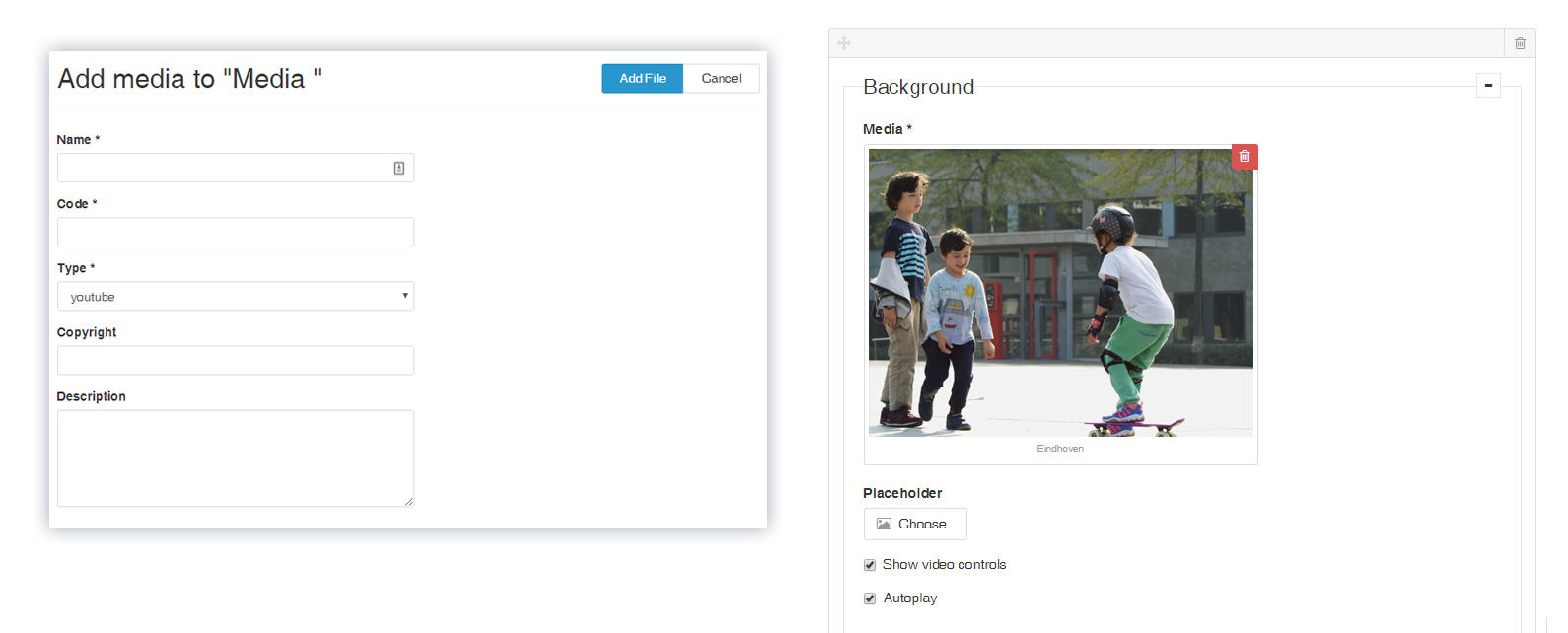
Example of adding video to the media database
Once you have added the video, you can still set a number of things in the pagepart:
- Placeholder
You can upload your own photo to be displayed as the video’s opening screen. (By default, YouTube or Vimeo will use a still from the video. This is often of poorer quality.) - Show video controls
Show the play/pause buttons and the progress indicator (slider) - Autoplay
Start playing the video automatically when the visitor opens the page. Sound is muted by default. Automatic playback is not always supported on mobile devices.
YouTube or Vimeo, which do you choose?
Each platform has its pros and cons. Do you know which platform you will choose? We will gladly help you make the right choice!