
Base Filter pagepart / Venuefinder
Make discovery easier with smart filters and search options.
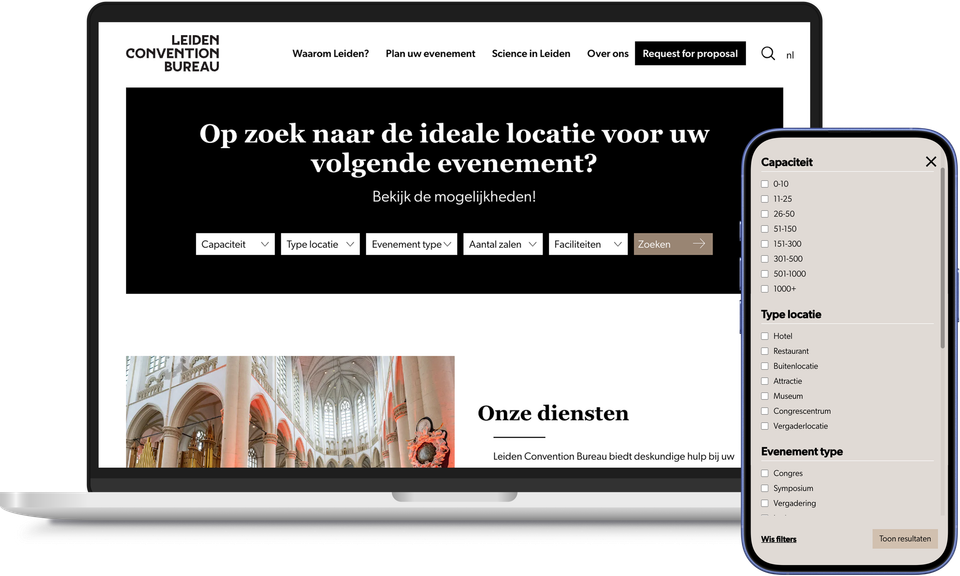
A hundred restaurants, eighty activities, a long list of places to stay: the wider the range on offer, the harder it becomes to find exactly what you’re looking for. Research into search behaviour shows that, after a handful of unfiltered search results, people often simply give up – not because the offering isn’t right, but because searching takes too much effort.
The Base Filter page component gives visitors control over what’s on offer. They can filter by category, area or type themselves, and further refine their search based on practical criteria such as price, capacity or facilities. This ensures that even a wide range of options remains easy to navigate.
For business destinations, the same technology operates under the name Venuefinder. Companies and organisers can then filter by venue capacity, venue type or facilities, quickly finding the meeting or conference venue that suits their event.
Base Filter really comes into its own on large overview pages, where searching without filters can quickly lead to too much scrolling and too few results. You can also use the page part on its own on a landing page, as a smart search function that automatically directs visitors, once they’ve made their choice, to an overview page featuring exactly that selection.
This means that nobody – whether a tourist or an organiser – has to settle for ‘good enough’: both can find exactly the right offering for them, without having to scroll endlessly.
This results in the Base Filter page part / Venuefinder
- Visitors can quickly find what suits them, even when there is a wide range of options
- The same technology can be used for both tourism offerings and business venues via Venuefinder
- Organisers who can quickly find the right meeting or conference venue based on capacity and facilities
- Practical filters such as price, area and type – exactly what visitors look for
- It can also be used as a standalone search function on a landing page, directing visitors straight to the relevant overview
- A greater chance that a visitor will actually make a choice, rather than being put off by too much choice