
Content Tiles pagepart
Quickly guide visitors to relevant content with visual and interactive tiles.
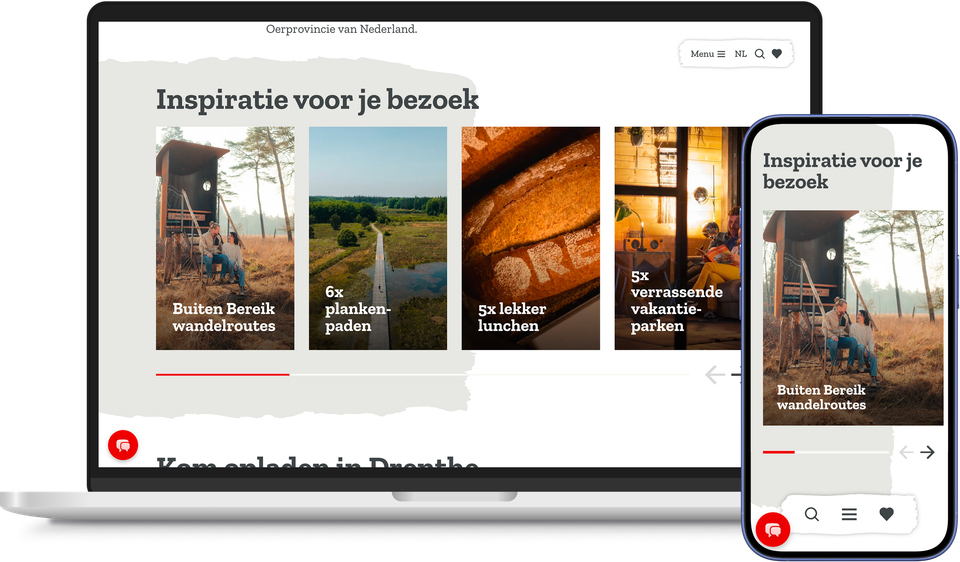
Whilst the Base Tiles page section automatically pulls content from plaece.base, you fill in the Content Tiles entirely yourself. That manual effort pays off: research into content curation shows that visitors often perceive a carefully curated selection as more personalised and reliable than a fully automated overview.
With the Content Tiles page component, you can display your own stories as tiles. Think of a theme on sustainable tourism, a guide for families with children, or a seasonal overview. You fill each tile yourself with an image, title and short text, and you decide where the tile links to.
You also have freedom when it comes to design. You can assign individual tiles or the entire page section their own colour, let them change colour with the season, or apply the style of a current campaign. This ensures the tile always matches the page’s theme.
The tiles can be swiped and work perfectly on mobile devices too. You decide how many tiles to display side by side, and you can also have them cycle automatically as a carousel. This allows you to quickly create multiple entry points to other pages on a landing page, without the screen feeling overcrowded.
If you’d like even more entry points to your key pages, take a look at the Doorway Grid page part. This way, you can always build a landing page that quickly directs visitors to the right next step.
This results in the Content Tiles pagepart
- Highlighting precisely the content that you consider editorially important
- A page that adapts to the season or a current campaign, without the need for separate design work
- More stories in less space, without the page feeling cluttered
- A pleasant experience on every screen, from desktop to mobile
- Visitors who discover multiple facets of your destination at a glance