
FAQ pagepart
Provide visitors with immediate answers whilst increasing the likelihood of appearing in AI search results.
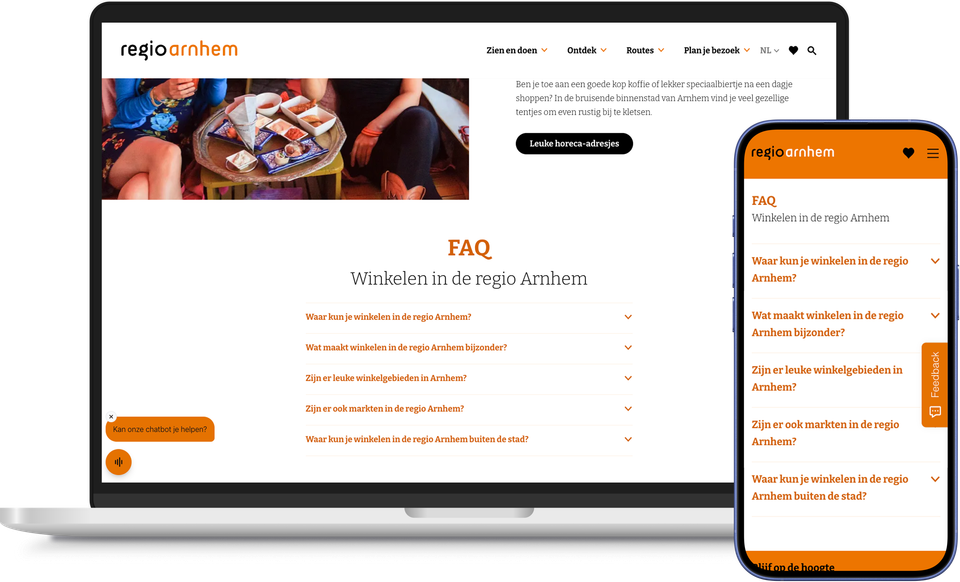
Every visitor has the same sort of questions, whether they’re looking at an information page, a themed landing page or a campaign: how does it work, how much does it cost, and where should I go?
The FAQ page part allows you to present these questions and answers clearly as a drop-down list. Visitors simply click on a question to open it and receive an immediate answer, without having to search or get in touch.
Behind the scenes, every query is tagged with structured data, making it easier for search engines and AI assistants to recognise and display those answers. That same format is also exactly what Google uses to display queries in ‘People also search for’ blocks – a place where you’d normally only appear if, by chance, other content covers the same topic. This increases the likelihood that your destination will be visible, even beyond your own website.
You can add the FAQ page part to any content page, from information pages to campaign pages. Would you like to display questions and answers specifically related to the offering itself, for example on a business’s or route’s detail page? Then use the plaece.faq add-on.
In this way, your visitors help themselves, and every frequently asked question also contributes to your searchability.
This results in the FAQ page section
- Visitors who can find answers quickly themselves, without having to get in touch
- Fewer enquiries to your customer service team or reception desk
- Greater visibility in search engines and AI assistants thanks to structured data
- Can be used on any content page, from information to campaigns
- Can be supplemented with the plaece.faq add-on for questions on the details pages of listings
- It builds trust among visitors who are exploring options, as any doubts are immediately dispelled