
Greatly improved search results in the internal search engine
We recently made a number of changes to the way the search engine works on the website. With these interventions, the content on the website can be found better. By adjusting the search algorithm and sorting, the internal search engine on the website returns more and better search results. So your visitor finds what he is looking for faster!
The changes made affect all venues, events, packages and itineraries coming from plaece.base. In a previous blog article, we wrote about how we wanted to improve the internal search engine and recently this improvement has been made available to everyone.
''A big improvement is visible in the search results, due to sorting by relevance.''
We would like to give a little more info on how the new sorting of the search function works. The new sorting option "relevance" works on the basis of scores given to items based on a search query. In practice, a search may still return unexpected results. To give a little more insight into how the score calculation now works, we have put some terms and use cases on paper. For individual use-cases, we can dive deeper into the results to see how we can further optimise the search function.
Glossary
- Search engine
The software used to make plaece.base items searchable (Elasticsearch). By ‘search engine’, we do not mean search engines such as Google or Bing. - Item
Items from plaece.base, such as a location, route or event. - Search index
The indexed items in the Elasticsearch search engine. A sort of library is created containing all the items that need to be findable. - Indexing
The process of storing items in the search engine so that they can be searched for. These items are stored in the search index. - Term
A word stored in the search engine
This is how our search engine works
The operation of the search functionality and its sorting can be summarised in three steps:
- Index
- Find
- Score calculation & sorting
Step 1: Indexing

Photo by Anthony Martino
To explain how sorting works, it is first necessary that the item is findable in the search engine. Briefly, words from items are stored as terms in the search index (some examples of words that might appear on a plaece.base detail page):
- Hotel room: hot, hote, hotel, hotelk, hotelka, hotelkam, hotelkame, hotelroom
- Hotel: hot, hote, hotel
- Breda: bre, bred, breda
(This is necessary so that the search term "hotel" also finds items containing the word "hotel room").
For each item, the following fields are indexed:
- Name
- Slug (url)
- Short description
- Long description
- Tags
- Categories
- Location (boost)
- Street
(This information can all be found on the plaece.basedetail page of an item, or is available as metadata)
After terms are stored in the search index, items are findable. As soon as an item is saved in plaece.base (or placed in the plaece.base via an import/connector), the search index is immediately updated.
Step 2: Finding

Photo by Jamie Street
As soon as a user searches the website, the search terms are looked up in the search index and the corresponding item is returned. It does not matter whether an item contains all search terms.
''At least one search term should match the words indexed.''
In addition, the user is allowed to make a typing error, so it is possible that an item is found due to a typing error that may not have been wanted.
Note: Because we do not yet sort the items at this step in the search process, no distinction is made between an item found with a spelling error and an item found without a spelling error.
Step 3: Scoring

Photo by Mika Baumeister
Once the visitor has performed a search, Elasticsearch returns all items that match one or more search terms. This list of results is not yet arranged in a logical order.
The results found still need to be sorted by relevance, so that the "most relevant result" is at the top. This is done by means of scores. Each result found is given a score by the search engine. Items with the highest scores come first (and are therefore at the top of the search results).
Score calculation based on three factors.
The calculations performed by Elasticsearch to calculate the score are very complex. It is often possible to deduce why an item has a certain score, but this is very labour-intensive and therefore impossible to perform for every item. Below, we explain which items are included in the calculation and how they affect the score.
To assign scores to items, we look at the terms within the items found. A number of items will contain a term more than once. In addition, some terms are more important than others.
These factors affect sorting:
- Term frequency
How often does a particular term appear within an item? The more frequently the term appears, the more important the item is. - Reverse item frequency
How often does a term appear across all items? Terms that appear in many items are less important because they are less specific. - Text length
How short is the text in which the term was found? The shorter the text, the more specifically it matches the search term. Shorter is better.
Per indexed field, the points of the above three factors are added up. In addition, it is possible to use a multiplier (boost) per field to increase the score. Currently, only the field 'place' gets a boost of 3. This way, we encourage that when searches are made on an "activity + place name", the place name becomes more important for ranking.
Example of search results
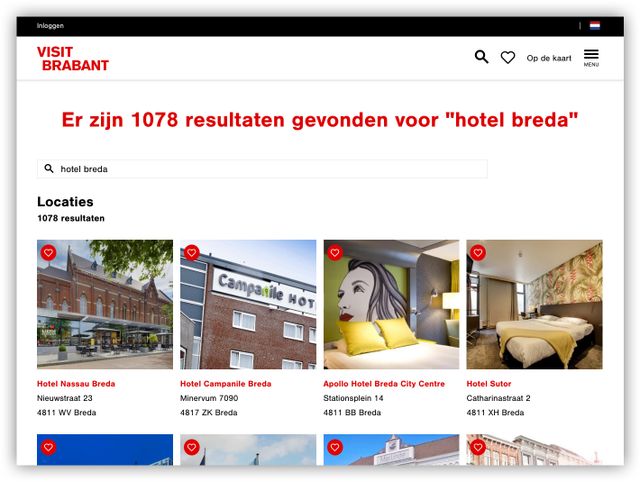
Now that it is a bit clearer how terms affect sorting, we give a brief example of cases where it could still yield "unexpected" results:
- Search request: 'hotel breda
- Search result: (2 results)
(For convenience's sake, we assume we are only looking at the textual description of the items and not at all other indexed fields, e.g. category or address).
-
Result No. 1:
“Hotel Rumors has 17 comfortable hotel rooms, a restaurant, a bar, two conference rooms and a covered, heated terrace.”Result number 2:
“At the ‘de Barones’ restaurant at Van der Valk Hotel Princevile Breda, guests – as well as visitors not staying at the hotel – are warmly welcomed every day of the year for breakfast, lunch and dinner.”
‘Hotel Rumors’ appears for the Van der Valk Hotel. At first glance, this seems confusing. After all, ‘Hotel Rumors’ only matches the term ‘hotel’, whilst the Van der Valk Hotel matches the terms ‘hotel’ and ‘Breda’.
However, this is not quite what happens in this scenario. If you check the indexing rules, the following occurs: for ‘Hotel Rumors’, two terms are indexed: ‘hotel’ and ‘hotelk’ (hotel room).
‘Hotelk’ matches ‘hotel’ when a single typo is taken into account. So now both items have two terms that match:
- Hotel Rumors: hotel & hotelk
- Van der Valk: hotel & breda
The term frequency is the same for both items. Namely (1+1) for each term a single point.
Text length has little impact. But again, most points go to Hotel Rumors as it has a shorter text (however, this is negligible).
However, the reverse item frequency does have a lot of impact in this case. If we compare the terms 'breda' and 'hotelk', it is easy to assume that 'hotelk' appears less often across all items. So this term is scored more important by ElasticSearch. So in this case, the uniqueness of the term causes Hotel Rumors to score higher.
(Observant readers may recall that we put a boost on the place name, so in the "real" world, the Van der Valk Hotel would indeed rank higher in search results).
Sorting by relevance
The search engine now indexes more, so it returns more results than before. Because the scores are now determined even better and sorted in a new way, the search engine now returns more relevant search results.
From now on, the new score calculation is applied to searches in the internal search engine on the website. When a search (with a search term) is performed (in the general search engine, in the UITagenda or in the plaece.base overviews), all results are automatically sorted by relevance. For the UITagenda, this means that from then on the results will no longer be automatically sorted by date (first upcoming event will be shown first).
Do you have questions about the new functionality or did you come across an unusual search result? Let us know and together we will make the search function even better!