

New interface visible from April
From April, the new name and branding will be visible on the login screen of plaece.base and plaece.creator (formerly ODP and CMS) for all partners. The features and functionality will continue to work as usual. If you have your own branding and name for the ODP, we will contact you personally. In that case, your own name for the ODP, colours and branding will remain as intact as possible for the time being. This way, you and your regional partners will retain a familiar interface for the time being.

Plaece.base - April 2024
From April 2024, you will receive a monthly mailing with all the improvements being made behind the scenes in plaece. The improvements in plaece.base will become available to everyone in April.
What has been improved?
- New interface and login screen
Plaece’s new branding in the login screens and user interface (formerly ODP) - API
Improvements to the API - Changes to features
"People with disabilities" has been renamed to "People with disabilities" and the "Smoke-free" option has been made available for all locations - Technical updates
Latest version of the underlying technology (PHP 8.3, Symfony, etc.)
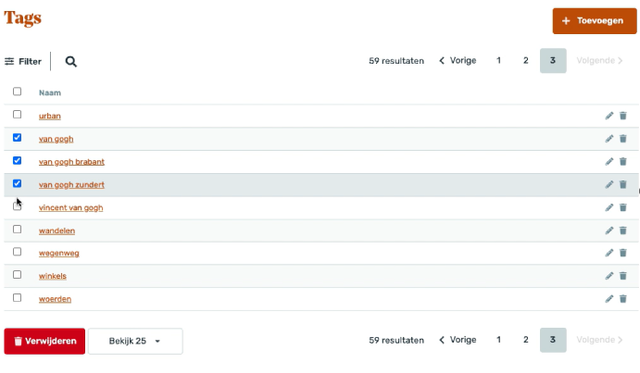
Highlight: 'Bulk removals' - step 1
It is now possible to remove things in bulk. In the first step, we have made this available for tags, markers, users and organisations. At a later stage, we will also roll out this feature for activities, locations, routes and packages.
New feature: Smart AI assistant - SEO texts per field
Let the AI assistant automatically generate SEO texts. Step-by-step, we work towards an AI assistant that can help editors create, edit, rewrite and translate locations and activities. We are activating this AI assistant for a number of partners. Haven't you been contacted yet but would like to test along in the trial beta version? Then you can: please send a message to hallo@plaece.nl/en o.v.v. participation trial.

Plaece.creator V2.70 - April 2024
In plaece.creator, you’ll see improvements as soon as an update has been implemented on your website. It’s therefore possible that you won’t see the improvements in plaece.creator until a later date. Would you like the improvements to be available at a time of your choosing? If so, please contact support@insiders.nl.
You can purchase new features as add-ons for your website. Adding features almost always requires an update, unless your website is already fully up to date.
What has been improved?
- Consent mode v2
New cookie settings in line with EU regulations. More information about Consent Mode v2 - New login screen and interface
Plaece’s new corporate identity is reflected in the login screens and the user interface (CMS). - ODP Categories (multi-select)
You use categories in your filterable overviews, on the map or for ‘nearby’ searches. You can now create a single category, which you can use in various places (previously, you had to create the same category multiple times) - Content tiles with 2 tiles
It is now possible to place 2 content tiles on the page (previously, there had to be at least 3) - Improvements to digital accessibility
Behind the scenes, improvements have been implemented to achieve an even better accessibility score. In particular, the use of forms has been significantly improved (plaece.forms).
Featured: Page part alignment
Would you like to align all pagepart titles left instead of centre? And are you now adjusting this manually for each pagepart? That is no longer necessary. We can set a default alignment for you. This is included in an update by default.
New feature: Video for mobile devices
Do you use a lot of video on your website? And do you sometimes see those black bars below/above a video on your phone? Or does a large part of your video get cut off on mobile? Then we have something great for you. You can now add a video in a large number of pageparts, especially for mobile devices. For a desktop/laptop you add a "normal" landscape video, while for mobile devices you add a "portrait" video. This ensures that your video is always displayed correctly on all devices! This feature can be purchased for a fee.
Receive plaece News automatically?
Plaece News is sent to all plaece licensees every month. If you do not yet receive it, sign up here.