
Plaece.base May 2024
From April 2024, you will receive a monthly mailing with all the improvements being made to Plaece behind the scenes. Every month we will release a new version of Plaece.base. This month's version is: V3.64. The improvements in Plaece.base below will be available to everyone in May.
What has been improved?
- New status for activities:
It is possible to assign a status to activities. Examples include: ‘Sold out’. A new status is now also available for use: ‘Scheduled’. - API
Improvements to the API for future flexibility and performance enhancements - Technical updates
Updates to the underlying technology (For those interested: Composer, Twig/Live components)
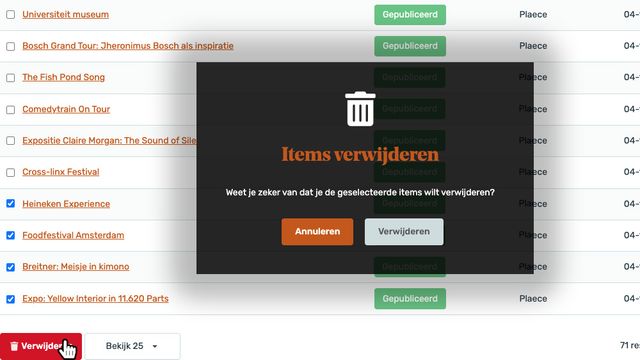
New feature: Delete multiple events simultaneously
The next step in adding bulk actions has been added: select multiple events and delete them in one go. This way, you can easily clean up your event database by deleting all (long) expired events.
New feature:
Smart AI assistant – Automatic SEO text generation (Pilot phase)
Let the AI assistant automatically generate SEO texts. Step-by-step, we work towards an AI-assistant that can help editors create, edit, rewrite and translate locations, activities, itineraries and packages. We are activating this AI assistant for a number of partners so that they can try out the new feature. As soon as the AI Assistant can be purchased as a feature, we will be able to tell you more about the costs and exact possibilities.

Plaece.creator May 2024
May's version will be numbered V2.71. This is important to know because then you can always check what the latest version number of your own website is. That way, you know what improvements will be available to you when your own website is updated.
For Plaece.creator, you’ll see improvements as soon as an update has been implemented on your website. It may therefore be the case that you only see the improvements in Plaece.creator at a later stage. Would you like the improvements to be available at a time of your choosing? If so, please contact support@insiders.nl.
You can purchase new features as add-ons for your website. Adding features almost always requires an update, unless your website is already fully up to date.
What has been improved?
- Optimised display for calendars with many entries
For activities and events, there may be a large number of dates and times listed. We now display the first 10 upcoming dates, with a ‘View more dates and times’ link. The next 10 results are then displayed. This prevents your page from becoming excessively long. - Vertical video thumbnails in the media library
Following the launch of the new ‘Video for mobile devices’ feature, we noticed that the thumbnails for vertical videos weren’t displaying correctly in the media library. This has now been resolved. - Additional filtering options for related items
On a location or activity detail page, you can display more related offerings (see also the blog: Entice visitors with related offerings). It is now also possible to filter the offerings by a specific category, tag, marker or attribute. - Exporting and importing redirects
Are you currently preparing a redesign or migration of your website? If so, we can now easily export a list of all your existing URLs for you. Once you’ve provided us with the correct redirects, we can then easily import them for you! - Automatic URL replacement
You’ll be familiar with this… You’ve filled your ‘underwater environment’ with content in preparation for your new site. When you go live with your website, it’s possible that some direct links may still point to the ‘underwater environment’. We’ve developed a feature that allows us to update all these links for you in one go. - Optimisations to story, carousel and hero page parts
Minor optimisations have been made to these page parts in terms of margins and alignment. In addition, it is now possible to have a ‘story’ convert into a ‘carousel’ on mobile devices. We can enable this for you on a per-website basis. - Icons for categories are displayed in the overview
Did you know that you can set icons for the categories on your website (if not, read the blog article: Setting icons and colours on the interactive map)? In plaece.creator, you can now also see straight away which icon you’ve set for each category in your category overviews. This way, you can see at a glance which categories you haven’t yet assigned an icon to. - Technical updates
Updates to the underlying technology (For those interested: Core, Symfony, NPM, Composer) and various performance improvements
New features
Base Content Map
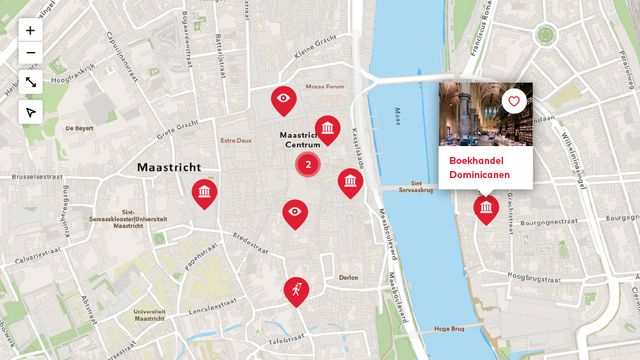
Do you make list blogs, listing the best tips? How great would it be if you could automatically place all entries in your blog on a map. That's exactly what you can do with the Base Content Map. This feature works in conjunction with the "Manual Base Item" feature.
Issuu embed
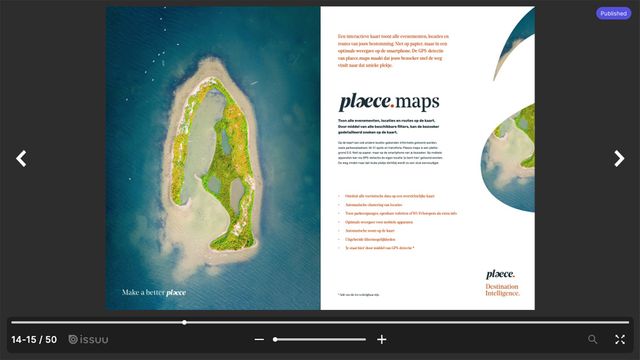
Do you make online brochures of your promotional brochure, itineraries, etc.? And do you use Issuu for that? Use this new feature to integrate your online flyer into your own website (note: you do need a paid Issuu account to make full use of this feature).
Place filters in the left-hand column of the website

You can add filters to overview pages on location, events and routes. These are standard at the top of the screen. Thanks to the efforts of Merk Fryslân, it is now also possible to place these filters in a sidebar. This way, you can offer more extensive filtering that always remains in view. Enrich the filters with icons and you offer your visitor a fresh and contemporary way to search through the beautiful offerings. Take a look at Friesland' s events calendar.
Receive Plaece News automatically?
Plaece News is sent to all Plaece licensees every month. If you do not yet receive it, sign up here.